Koios
Koios provides open-source, elastic API layer for querying Cardano blockchain across mainnet, testnets, and guildnet. Run Koios as a light web service or deploy your own instance with custom endpoints and automatic failover.
Using Koios API
API Documentation
Access the full API documentation at api.koios.rest. Koios leverages PostgREST, enabling vertical and horizontal data filtering with built-in ordering and custom paging. See the API usage guide for details.
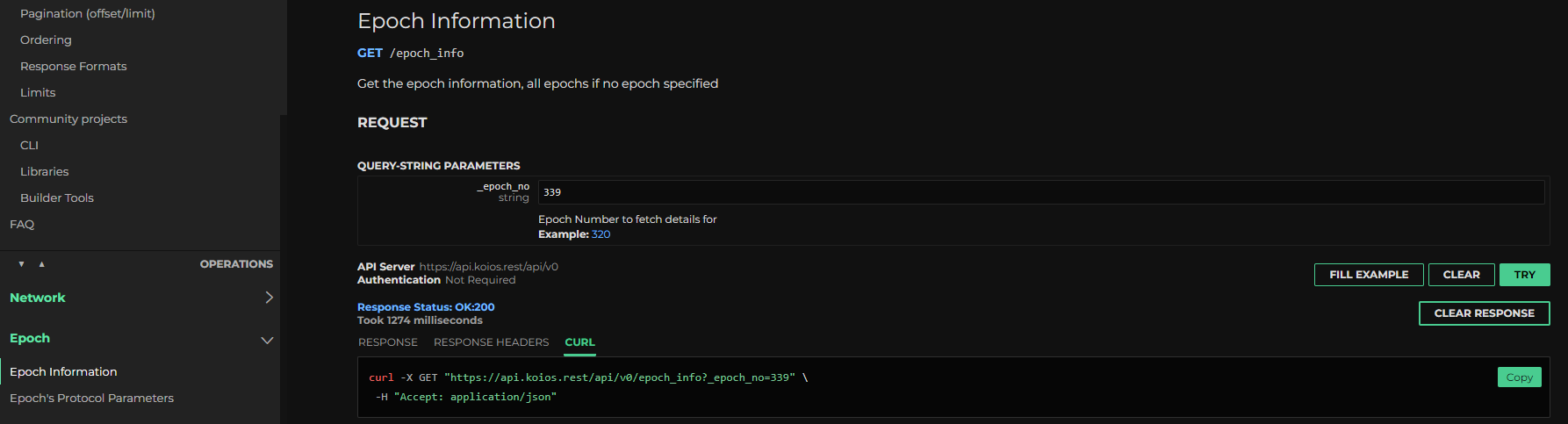
Each endpoint provides sample curl commands you can execute directly from your browser for testing.
Rate Limits
Remote Koios usage includes protective measures against spamming and unintentional denial-of-service. Review the limits documentation before integration.
Feature Requests
Report issues or request features on the Koios Artifacts repository. Discuss in the Koios Telegram group.
Running Your Own Instance
Run Koios locally to remove API limits, add customization, reduce latency, or contribute to the network. The guild-operators suite provides scripts for deploying gRest instances with full API compatibility.
Keep cardano-db-sync and postgres together. Splitting them without proper tuning results in poor performance. PostgREST and HAProxy can run as separate microservices once familiar with deployment.
Setup Steps
-
Prepare system: Install dependencies and create folder structures using the prereqs script
-
Install PostgreSQL: Set up PostgreSQL server with infrastructure-appropriate tuning. See PostgreSQL guide
-
Set up cardano-node: Install and sync node to current epoch. See node installation guide. Optionally install
cardano-submit-apifor transaction submission. -
Deploy cardano-db-sync: Set up dbsync instance (use snapshots rather than syncing from scratch). Follow dbsync guide and run as systemd service.
-
Install gRest: Run
setup-grest.shas detailed here. For mainnet deployment:./setup-grest.sh -f -i prmcd -q -b <branch/tag> -
[Optional] Add Ogmios: Install Ogmios for WebSocket access (requires advanced session management).
Service Configuration
Default configuration, services, and ports:
| Component | Config | Port | Service Name |
|---|---|---|---|
| PostgreSQL | /etc/postgresql/14/main/postgresql.conf | 5432 | postgresql |
| Cardano-Node | /opt/cardano/cnode/files/config.json | 6000 | cnode |
| Cardano-Submit-API | /opt/cardano/cnode/files/config.json | 8090 | cnode-submit-api |
| Cardano-DB-Sync | /opt/cardano/cnode/files/dbsync.json | N/A | cnode-dbsync |
| PostgREST | /opt/cardano/cnode/priv/grest.conf | 8050 | cnode-postgrest |
| HAProxy | /opt/cardano/cnode/files/haproxy.cfg | 8053 | cnode-haproxy |
| Prometheus Exporter | /opt/cardano/cnode/scripts/getmetrics.sh | 8059 | cnode-grest_exporter |
Entry point: Query endpoints through HAProxy port (enable SSL as described here). Adjust firewall rules to expose only HAProxy port.
Join Koios Cluster
Participate in the Koios cluster by:
-
Submit PR on koios-artifacts topology with your connectivity information
-
Open ports for Prometheus Exporter, HAProxy, and Cardano-Submit-API to monitoring instances
-
Commit to following version releases (typically Saturday 8am UTC with advance notification)
Community
Join bi-weekly open meetings (2nd/4th Thursday each month). Follow the Koios Telegram discussions for updates.
For Koios client libraries and tools, see Builder Tools > Koios.