Building the Ticker
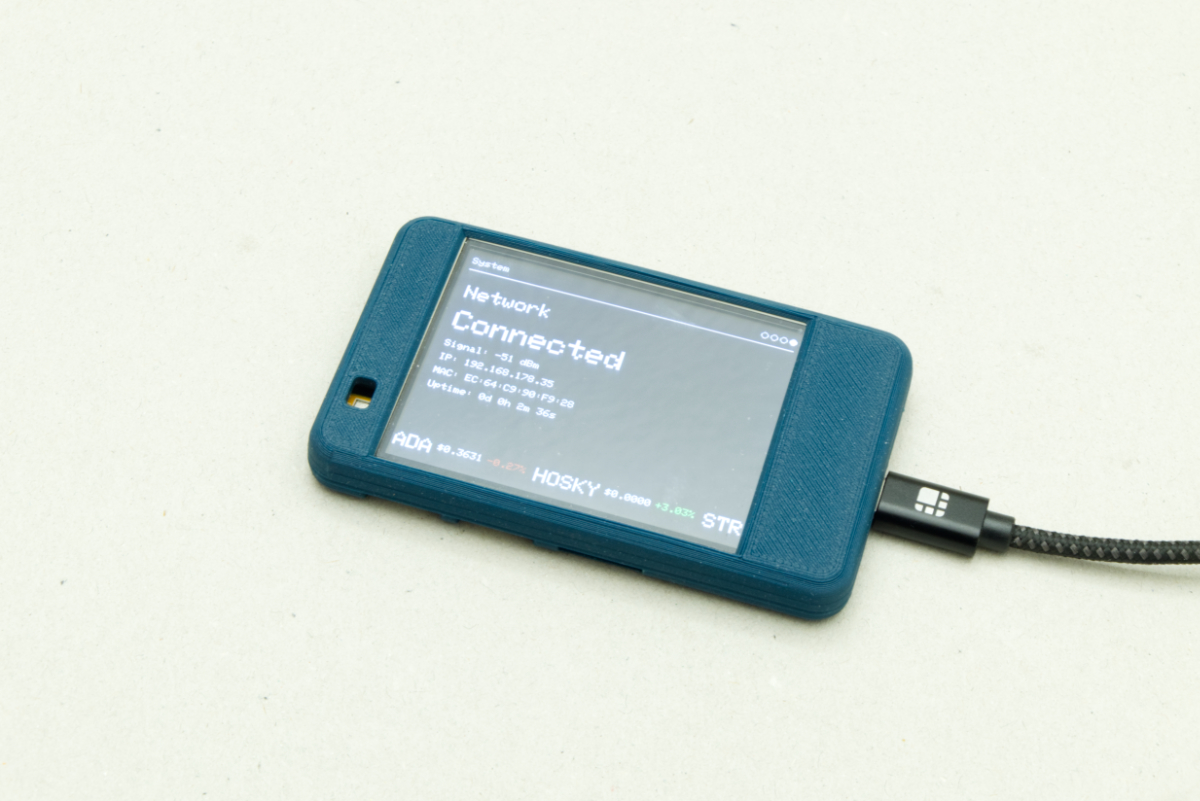
Now build the Cardano Ticker: a multi-screen display that rotates through wallet balance, tokens, NFTs, and status, with a stock-market-style scrolling ticker along the bottom.
What we're building
The ticker shows:
- Your ADA wallet balance.
- All token holdings with prices and 24-hour changes.
- NFT collections with floor prices.
- System status info.
- A scrolling ticker at the bottom with token prices.
It rotates between screens every 10 seconds. Data updates periodically - wallet balance every minute, tokens / NFTs every 10 minutes. On startup it connects to WiFi, fetches initial data, shows the first screen. During operation it keeps WiFi alive, updates data on schedule, rotates screens, and animates the bottom ticker.
If you've finished the previous workshops, you already know most of this. The project combines:
- WiFi connectivity from Workshop 02 - Fetch Wallet Balance.
- Display techniques from Workshop 02 - Display Data.
- API fetching from Workshop 02 - Fetch Wallet Balance and Workshop 03 - Connect and Read Sensor Data.
This workshop uses mainnet data; the examples use the CardanoThings.io wallet.
Project structure
The CardanoTicker is a multi-file Arduino project: each component has its own .h and .cpp files. Walk through each one below. Full source: github.com/CardanoThings/Workshops/tree/main/Workshop-04/examples/CardanoTicker.
Configuration files
Before the code, point the project at your wallet and APIs.
config.cpp - your addresses
This stores Cardano addresses and API endpoints. Edit it with your own:
stakeAddress- your stake address (stake1...). Used for Koios wallet-balance lookups (you learned about stake addresses in Workshop 02).walletAddress- your payment address (addr1...). Used by MinSwap for tokens and NFTs.cexplorerApiKey- your Cexplorer.io API key from the previous lesson.
Both are visible in your wallet (Yoroi, Eternl, Vespr) - the stake address under "Staking" or "Rewards", the payment address as your main receive address. They're also on CardanoScan and Cexplorer.
config.cpp:
/**
 * config.cpp - Configuration implementation file
 *
 * This file defines the actual values for wallet addresses and API endpoints
 * that are declared in config.h. Edit these values with your own addresses
 * and API keys before uploading to your device.
 */

#include "config.h"

// Your Cardano stake address (starts with "stake1..." on mainnet)
// Used to fetch your ADA wallet balance from the Koios API
// Replace this with your own stake address
String stakeAddress =
    "stake1u8l0y82je0t2wkkpps97rv0q7lf882q0fc24gwjz9nacz0c5gt5k"
    "3";

// Your Cardano wallet address (starts with "addr1..." on mainnet)
// Used to fetch your token and NFT positions from the MinSwap API
// Replace this with your own wallet address
String walletAddress =
    "addr1q8xy5cfmccecvvr2z7ns7mzld8qkq73lgwnq7vy3my0s5rl77gw49j7k5advzrqtuxc7p"
    "a7jww5q7ns42sayyt8msylsx4k2qx";

// Cexplorer API key for accessing NFT floor price data
// Get your free API key from: https://cexplorer.io/api
// Replace "your-api-key-here" with your actual API key
String cexplorerApiKey = "your-api-key-here";

// API endpoint URLs
// These point to Cardano blockchain APIs used to fetch wallet data

// Koios API endpoint - fetches wallet balance (ADA)
// Koios is a Cardano blockchain indexer that provides fast access to blockchain
// data
const char *koiosApiUrl = "https://api.koios.rest/api/v1/account_info";

// MinSwap API endpoint - fetches token and NFT portfolio data
// MinSwap is a decentralized exchange (DEX) that provides portfolio information
const char *minswapApiUrl =
    "https://monorepo-mainnet-prod.minswap.org/v1/portfolio/tokens";

// Cexplorer API endpoint - fetches NFT collection floor prices
// Cexplorer provides detailed NFT collection information including floor prices
const char *cexplorerApiUrl =
    "https://api-mainnet-stage.cexplorer.io/v1/policy/detail";
config.h:
/**
 * config.h - Configuration header file
 *
 * This file declares external variables that are defined in config.cpp.
 * These contain your wallet addresses and API endpoints.
 *
 * Important: You need to edit config.cpp with your actual addresses!
 */

#ifndef CONFIG_H
#define CONFIG_H

#include <Arduino.h>

// Your Cardano stake address (starts with "stake1..." on mainnet)
// This is used to fetch your wallet balance from Koios API
extern String stakeAddress;

// Your Cardano wallet address (starts with "addr1..." on mainnet)
// This is used to fetch your token and NFT positions from MinSwap API
extern String walletAddress;

// API endpoint URLs
// These point to the Cardano blockchain APIs we use to fetch data
extern const char *koiosApiUrl;      // Koios API - for wallet balance
extern const char *minswapApiUrl;    // MinSwap API - for tokens and NFTs
extern const char *cexplorerApiUrl;  // Cexplorer API - for NFT floor prices

#endif
Source:
Workshop-04/examples/CardanoTicker/config.cpp,config.h
secrets.h - WiFi credentials
Stored separately so it can be .gitignored. Copy secrets.h.example to secrets.h and fill in WIFI_SSID / WIFI_PASSWORD.
/**
 * secrets.h.example - Template file for sensitive configuration values
 *
 * This is a template file showing what secrets need to be configured.
 * To use this file:
 * 1. Copy this file to secrets.h (secrets.h is in .gitignore and won't be committed)
 * 2. Fill in your actual WiFi credentials and API keys
 * 3. Never commit secrets.h to version control!
 *
 * IMPORTANT: Keep your secrets.h file private and never share it publicly.
 */

#ifndef SECRETS_H
#define SECRETS_H

// Your WiFi network name (SSID)
// The name of the WiFi network your device should connect to
#define WIFI_SSID ""

// Your WiFi network password
// The password required to connect to your WiFi network
#define WIFI_PASSWORD ""

// Cexplorer API key for accessing NFT floor price data
// Get your free API key from: https://cexplorer.io/api
// This key is used to fetch NFT collection floor prices
#define CEXPLORER_API_KEY ""

#endif
Source:
Workshop-04/examples/CardanoTicker/secrets.h.example
WiFi manager and data fetcher
The WiFi manager handles connection and auto-reconnect. The data fetcher organises every API call from the previous lesson (Koios + MinSwap + Cexplorer) into one reusable module - fetches periodically, stores results for the screens to read.
Both modules use the same techniques as Workshop 02, just packaged. The data fetcher rate-limits (wallet every 1 minute; tokens / NFTs every 10 minutes) and exposes getters like getWalletBalance() and getToken(i) that screen files use.
wifi_manager.cpp:
/**
 * wifi_manager.cpp - WiFi connection management implementation
 *
 * This file implements WiFi connection management with automatic reconnection.
 * It stores WiFi credentials and periodically attempts to connect or reconnect
 * if the connection is lost.
 */

#include "wifi_manager.h"
#include <WiFi.h>

namespace {
// Time to wait between reconnection attempts (5 seconds)
// Prevents rapid reconnection attempts that could overwhelm the WiFi module
const unsigned long WIFI_RETRY_INTERVAL_MS = 5000;

// Maximum time to wait for a connection before retrying (12 seconds)
// If connection takes longer than this, we assume it failed and retry
const unsigned long WIFI_CONNECT_TIMEOUT_MS = 12000;

// Stored WiFi credentials (set by wifiManagerSetup)
const char *storedSsid = nullptr;
const char *storedPassword = nullptr;

// Timestamp of the last connection attempt
// Used to implement retry intervals and connection timeouts
unsigned long lastAttemptMs = 0;

/**
 * Attempt to connect to WiFi
 *
 * Disconnects any existing connection, sets WiFi to station mode,
 * and begins connection with stored credentials.
 *
 * @param force If true, attempts connection immediately regardless of retry
 * interval
 */
void attemptConnection(bool force) {
  // Don't attempt connection if SSID is not set or empty
  if (storedSsid == nullptr || storedSsid[0] == '\0') {
    return;
  }

  const unsigned long now = millis();
  // Respect retry interval unless forced (e.g., initial setup)
  if (!force && (now - lastAttemptMs) < WIFI_RETRY_INTERVAL_MS) {
    return;
  }

  lastAttemptMs = now;

  Serial.print("WiFi: connecting to ");
  Serial.println(storedSsid);

  // Disconnect any existing connection and clear stored credentials
  WiFi.disconnect(true, true);
  // Set WiFi to station mode (client mode, not access point)
  WiFi.mode(WIFI_STA);
  // Begin connection attempt
  WiFi.begin(storedSsid, storedPassword);
}
} // namespace

/**
 * Initialize WiFi manager with credentials
 *
 * Stores the WiFi credentials and immediately attempts to connect.
 *
 * @param ssid The WiFi network name (SSID)
 * @param password The WiFi network password
 */
void wifiManagerSetup(const char *ssid, const char *password) {
  storedSsid = ssid;
  storedPassword = password;
  // Force immediate connection attempt on setup
  attemptConnection(true);
}

/**
 * Monitor and maintain WiFi connection
 *
 * Checks connection status and automatically attempts to reconnect
 * if disconnected. Uses timeout mechanism to detect failed connections.
 * Should be called repeatedly in the main loop().
 */
void wifiManagerLoop() {
  // If already connected, no action needed
  if (WiFi.status() == WL_CONNECTED) {
    return;
  }

  const unsigned long now = millis();
  // Check if connection attempt has timed out
  // Also handles case where no attempt has been made yet (lastAttemptMs == 0)
  const bool timedOut =
      (now - lastAttemptMs) > WIFI_CONNECT_TIMEOUT_MS || lastAttemptMs == 0;

  if (timedOut) {
    // Retry connection (respects retry interval)
    attemptConnection(false);
  }
}

/**
 * Check if WiFi is currently connected
 *
 * @return true if WiFi status is WL_CONNECTED, false otherwise
 */
bool wifiManagerIsConnected() { return WiFi.status() == WL_CONNECTED; }
wifi_manager.h:
/**
 * wifi_manager.h - Header file for WiFi connection management
 *
 * This file declares functions for managing WiFi connectivity on the ESP32.
 * It handles connection setup, connection monitoring, and provides status
 * information about the WiFi connection state.
 */

#ifndef WIFI_MANAGER_H
#define WIFI_MANAGER_H

#include <Arduino.h>

/**
 * Initialize WiFi connection
 *
 * Sets up WiFi with the provided credentials and attempts to connect.
 * Call this once in setup() before using other WiFi functions.
 *
 * @param ssid The WiFi network name (SSID)
 * @param password The WiFi network password
 */
void wifiManagerSetup(const char *ssid, const char *password);

/**
 * Update WiFi connection status
 *
 * Monitors the WiFi connection and attempts to reconnect if disconnected.
 * Call this repeatedly in loop() to maintain connection.
 */
void wifiManagerLoop();

/**
 * Check if WiFi is currently connected
 *
 * @return true if connected to WiFi, false otherwise
 */
bool wifiManagerIsConnected();

#endif
data_fetcher.cpp:
/**
 * data_fetcher.cpp - Implementation of blockchain data fetching
 *
 * This file contains all the code that talks to Cardano blockchain APIs to
 * fetch your wallet data. It handles:
 * - Fetching wallet balance from Koios API
 * - Fetching token positions from MinSwap API
 * - Fetching NFT collection data from MinSwap and Cexplorer APIs
 * - Storing and organizing all this data for display
 *
 * Key Concepts:
 * - HTTP requests: How we talk to APIs over the internet
 * - JSON parsing: APIs return data in JSON format, we need to extract it
 * - Rate limiting: We don't fetch too often to avoid hitting API limits
 */

#include "data_fetcher.h"

// Libraries for making HTTP requests and parsing JSON responses
#include <ArduinoJson.h> // Parses JSON data from APIs
#include <HTTPClient.h>  // Makes HTTP requests (GET, POST) to APIs
#include <WiFi.h>        // WiFi functionality

// Our custom headers
#include "config.h"       // API URLs and wallet addresses
#include "wifi_manager.h" // WiFi connection management

// Private namespace - these variables are only accessible within this file
namespace {

// How often to fetch wallet balance (1 minute = 60,000 milliseconds)
// UL = unsigned long (ensures the number is treated as the right type)
constexpr unsigned long KOIOS_INTERVAL_MS = 60UL * 1000UL;

// How often to fetch token/NFT data (10 minutes = 600,000 milliseconds)
// We fetch this less often because it's more data and takes longer
constexpr unsigned long PORTFOLIO_INTERVAL_MS = 10UL * 60UL * 1000UL;

// Maximum number of NFT policy IDs we can store
// Policy ID = unique identifier for an NFT collection
// Limited to 8 to match display capacity and API call limits
constexpr size_t MAX_POLICY_IDS = 8;

// Maximum number of tokens we can store (limited by screen display)
constexpr size_t MAX_TOKENS = 8;

// Maximum number of NFT collections we can store (limited by screen display)
constexpr size_t MAX_NFTS = 8;

// Global variables to store fetched data
// These persist between function calls (unlike local variables)

float walletBalance = 0.0f; // Your ADA balance (in ADA, not Lovelace)
int tokenCount = 0;         // How many different tokens you own
int nftCount = 0;           // How many different NFT collections you own

// Array to store Policy IDs (one per NFT collection)
// We need these to fetch floor prices from Cexplorer API
String policyIds[MAX_POLICY_IDS];
int policyIdCount = 0; // How many Policy IDs we've collected

// Arrays to store token and NFT data
// Arrays are like lists - we can store multiple items
TokenInfo tokens[MAX_TOKENS]; // Array of token information
NFTInfo nfts[MAX_NFTS];       // Array of NFT collection information

// Timestamps to track when we last fetched data
// Used to implement rate limiting (don't fetch too often)
unsigned long lastKoiosFetch = 0;     // When we last fetched wallet balance
unsigned long lastPortfolioFetch = 0; // When we last fetched tokens/NFTs

// Forward declarations - these functions are defined later in this file
// We declare them here so they can be called from other functions
void fetchWalletBalance(); // Fetches ADA balance from Koios
void fetchMinSwapData();   // Fetches tokens/NFTs from MinSwap
void fetchCexplorerData(const String &policyId); // Fetches NFT floor prices

} // namespace

/**
 * Initialize the data fetcher
 *
 * This function resets all data storage to zero/empty. It's called once at
 * startup to ensure we start with clean data.
 *
 * Think of it like clearing a whiteboard before starting a new lesson.
 */
void initDataFetcher() {
  // Reset all counters to zero
  walletBalance = 0.0f;
  tokenCount = 0;
  nftCount = 0;
  policyIdCount = 0;
  lastKoiosFetch = 0;
  lastPortfolioFetch = 0;

  // Clear all token data arrays
  // Loop through each position in the array and set it to empty/default values
  for (size_t i = 0; i < MAX_TOKENS; ++i) {
    tokens[i].ticker = "";      // Empty string
    tokens[i].amount = 0.0f;    // Zero amount
    tokens[i].value = 0.0f;     // Zero value
    tokens[i].change24h = 0.0f; // Zero change
  }

  // Clear all NFT data arrays
  for (size_t i = 0; i < MAX_NFTS; ++i) {
    nfts[i].name = "";         // Empty name
    nfts[i].amount = 0.0f;     // Zero amount
    nfts[i].floorPrice = 0.0f; // Zero floor price
    nfts[i].policyId = "";     // Empty policy ID
  }
}

/**
 * Update wallet balance data from Koios API
 *
 * This function implements rate limiting - it only fetches data if:
 * 1. WiFi is connected
 * 2. Enough time has passed since last fetch (1 minute)
 *
 * Rate limiting is important because:
 * - APIs have limits on how often you can request data
 * - Fetching too often wastes bandwidth and battery
 * - Wallet balance doesn't change that frequently anyway
 */
void updateKoiosData() {
  // Check if WiFi is connected - we can't fetch data without internet
  if (!wifiManagerIsConnected()) {
    return; // Exit early if no WiFi
  }

  // Get current time in milliseconds since device started
  const unsigned long now = millis();

  // Rate limiting check:
  // - If lastKoiosFetch is 0, we've never fetched (allow it)
  // - Otherwise, only fetch if at least 1 minute has passed
  if (lastKoiosFetch != 0 && (now - lastKoiosFetch) < KOIOS_INTERVAL_MS) {
    return; // Not enough time has passed, skip this update
  }

  // Record that we're fetching now
  lastKoiosFetch = now;

  // Actually fetch the wallet balance from Koios API
  fetchWalletBalance();
}

/**
 * Update token and NFT portfolio data
 *
 * This function fetches your token positions and NFT collections from MinSwap,
 * then fetches NFT floor prices from Cexplorer. It only runs every 10 minutes
 * because this data doesn't change as frequently and the API calls take longer.
 *
 * Process:
 * 1. Fetch tokens and NFTs from MinSwap API
 * 2. Extract Policy IDs from NFT data
 * 3. Fetch floor prices for each NFT collection from Cexplorer API
 */
void updatePortfolioData() {
  // Check WiFi connection first
  if (!wifiManagerIsConnected()) {
    return; // Can't fetch without internet
  }

  // Rate limiting - only fetch every 10 minutes
  const unsigned long now = millis();
  if (lastPortfolioFetch != 0 &&
      (now - lastPortfolioFetch) < PORTFOLIO_INTERVAL_MS) {
    return; // Not enough time has passed
  }

  // Record fetch time
  lastPortfolioFetch = now;

  // Step 1: Fetch tokens and NFTs from MinSwap
  // This populates the tokens[] and nfts[] arrays, and collects Policy IDs
  fetchMinSwapData();

  // Step 2: Fetch floor prices for each NFT collection from Cexplorer
  // We loop through all Policy IDs we collected and fetch floor price data
  // This gives us the "floor price" (lowest selling price) for each collection
  for (int i = 0; i < policyIdCount; ++i) {
    fetchCexplorerData(policyIds[i]);
  }
}

/**
 * Getter functions - These provide access to the stored data
 *
 * These are simple functions that return the values of our global variables.
 * Other files (like screen files) call these to get data for display.
 */

// Return your current ADA wallet balance
float getWalletBalance() { return walletBalance; }

// Return how many different tokens you own
int getTokenCount() { return tokenCount; }

// Return how many different NFT collections you own
int getNftCount() { return nftCount; }

// Return when wallet balance was last fetched (for "Last updated" display)
unsigned long getLastKoiosFetchTime() { return lastKoiosFetch; }

/**
 * Get information about a specific token
 *
 * @param index Which token to get (0 = first token, 1 = second, etc.)
 * @return TokenInfo structure, or empty structure if index is invalid
 *
 * Example: getToken(0) returns your first token, getToken(1) returns your
 * second
 */
TokenInfo getToken(int index) {
  // Create an empty token structure as default
  TokenInfo empty = {"", 0.0f, 0.0f, 0.0f};

  // Validate index - make sure it's within valid range
  // index must be >= 0 and < tokenCount
  if (index < 0 || index >= tokenCount) {
    return empty; // Invalid index, return empty structure
  }

  // Valid index, return the token data
  return tokens[index];
}

/**
 * Get information about a specific NFT collection
 *
 * @param index Which collection to get (0 = first collection, 1 = second, etc.)
 * @return NFTInfo structure, or empty structure if index is invalid
 */
NFTInfo getNFT(int index) {
  // Create an empty NFT structure as default
  NFTInfo empty = {"", 0.0f, 0.0f, ""};

  // Validate index
  if (index < 0 || index >= nftCount) {
    return empty; // Invalid index, return empty structure
  }

  // Valid index, return the NFT collection data
  return nfts[index];
}

namespace {

/**
 * Fetch wallet balance from Koios API
 *
 * Koios is a Cardano blockchain indexer - it provides fast access to blockchain
 * data without having to query the blockchain directly (which is slow).
 *
 * Process:
 * 1. Create HTTP client
 * 2. Build JSON request with your stake address
 * 3. Send POST request to Koios API
 * 4. Parse JSON response
 * 5. Extract balance (in Lovelace) and convert to ADA
 *
 * Important Cardano concepts:
 * - Stake Address: Your wallet's staking address (starts with "stake1...")
 * - Lovelace: The smallest unit of ADA (like cents to dollars)
 * - 1 ADA = 1,000,000 Lovelace
 * - We convert Lovelace to ADA for display
 */
void fetchWalletBalance() {
  Serial.println();
  Serial.println("--- Fetching Wallet Balance from Koios ---");

  // Create HTTP client object - this handles internet communication
  HTTPClient http;

  // Set the API endpoint URL (defined in config.h)
  http.begin(koiosApiUrl);

  // Tell the API we're sending JSON data
  http.addHeader("Content-Type", "application/json");

  // Build the JSON request payload
  // Koios API expects: {"_stake_addresses":["stake1..."]}
  // We're asking: "What's the balance for this stake address?"
  String jsonPayload = "{\"_stake_addresses\":[\"";
  jsonPayload += stakeAddress; // Your stake address from config.h
  jsonPayload += "\"]}";

  Serial.println("Sending POST request to Koios...");
  Serial.print("Payload: ");
  Serial.println(jsonPayload);

  // Send the HTTP POST request and get response code
  // POST means we're sending data (unlike GET which just requests data)
  int httpResponseCode = http.POST(jsonPayload);

  // Check if request was successful (response code > 0 means success)
  if (httpResponseCode > 0) {
    Serial.print("HTTP Response Code: ");
    Serial.println(httpResponseCode);

    // Get the response data (this is JSON text)
    String response = http.getString();

    // Create a JSON document to parse the response
    // 2048 = maximum size of JSON we expect (in bytes)
    DynamicJsonDocument doc(2048);

    // Parse the JSON string into a structured document we can access
    DeserializationError error = deserializeJson(doc, response);

    // Check if parsing was successful
    if (!error) {
      // Check if response is an array with at least one item
      if (doc.is<JsonArray>() && doc.size() > 0) {
        // Get the first (and only) account info object
        JsonObject accountInfo = doc[0];

        // Extract balance as a string (APIs often return large numbers as
        // strings)
        const char *balanceStr = accountInfo["total_balance"];
        long long balanceLovelace = 0;

        // Convert string to number (atoll = "ASCII to long long")
        if (balanceStr != nullptr) {
          balanceLovelace = atoll(balanceStr);
        }

        // Convert Lovelace to ADA
        // Example: 5,000,000 Lovelace / 1,000,000 = 5.0 ADA
        walletBalance = balanceLovelace / 1000000.0;

        // Print success message to Serial Monitor
        Serial.println();
        Serial.println("✓ Wallet Balance Fetched Successfully!");
        Serial.print("Stake Address: ");
        Serial.println(accountInfo["stake_address"].as<const char *>());
        Serial.print("Total Balance: ");
        Serial.print(walletBalance, 6); // Print with 6 decimal places
        Serial.println(" ADA");
      } else {
        Serial.println("Error: Empty response from Koios API");
      }
    } else {
      // JSON parsing failed - maybe API returned invalid JSON
      Serial.print("JSON parsing failed: ");
      Serial.println(error.c_str());
    }
  } else {
    // HTTP request failed (network error, timeout, etc.)
    Serial.print("Error in HTTP request. Response Code: ");
    Serial.println(httpResponseCode);
  }

  // Always close the HTTP connection when done
  http.end();
}

/**
 * Fetch token and NFT data from MinSwap API
 *
 * MinSwap is a DEX (Decentralized Exchange) on Cardano. Their API provides
 * portfolio information including:
 * - Token positions (what tokens you own and their values)
 * - NFT positions (what NFTs you own, grouped by collection)
 *
 * Process:
 * 1. Build URL with your wallet address as a parameter
 * 2. Send GET request (simpler than POST - just requesting data)
 * 3. Parse JSON response
 * 4. Extract tokens and store in tokens[] array
 * 5. Extract NFTs, group by Policy ID, and store in nfts[] array
 * 6. Collect Policy IDs for later floor price fetching
 */
void fetchMinSwapData() {
  Serial.println();
  Serial.println("--- Fetching Tokens and NFTs from MinSwap ---");

  // Create HTTP client
  HTTPClient http;

  // Build the API URL with query parameters
  // Query parameters are added after "?" in the URL
  // Example:
  // https://api.minswap.org/v1/portfolio/tokens?address=addr1...&only_minswap=true
  String fullUrl = String(minswapApiUrl);
  fullUrl += "?address=";
  fullUrl += walletAddress;               // Your wallet address from config.h
  fullUrl += "&only_minswap=true";        // Only show tokens from MinSwap
  fullUrl += "&filter_small_value=false"; // Don't filter out small value tokens

  Serial.print("Requesting: ");
  Serial.println(fullUrl);

  // Set the URL and send GET request
  // GET is simpler than POST - we're just requesting data, not sending data
  http.begin(fullUrl);
  Serial.println("Sending GET request to MinSwap...");
  int httpResponseCode = http.GET();

  if (httpResponseCode > 0) {
    Serial.print("HTTP Response Code: ");
    Serial.println(httpResponseCode);

    String response = http.getString();
    DynamicJsonDocument doc(8192);
    DeserializationError error = deserializeJson(doc, response);

    if (!error) {
      Serial.println();
      Serial.println("✓ MinSwap Data Fetched Successfully!");

      // Check if response contains "positions" data
      if (doc.containsKey("positions")) {
        JsonObject positions = doc["positions"];

        // Process NFT positions first
        if (positions.containsKey("nft_positions")) {
          JsonArray nftArray = positions["nft_positions"];

          // Reset NFT storage before processing new data
          nftCount = 0;
          policyIdCount = 0;

          // Process each NFT position in the array
          // MinSwap returns each NFT as a separate entry, but we want to group
          // them by collection (Policy ID). So if you own 3 NFTs from the same
          // collection, we'll count them as one collection with amount = 3.
          for (int i = 0;
               i < nftArray.size() && nftCount < static_cast<int>(MAX_NFTS);
               ++i) {
            JsonObject nft = nftArray[i];

            // Get the Policy ID (also called "currency_symbol" in MinSwap API)
            // Policy ID is like a collection identifier - all NFTs from the
            // same collection have the same Policy ID
            const char *currencySymbol = nft["currency_symbol"];

            // Skip if no Policy ID (shouldn't happen, but safety check)
            if (currencySymbol == nullptr) {
              continue; // Skip to next NFT
            }

            String policyId = String(currencySymbol);

            // Extract NFT collection name from metadata
            // MinSwap provides metadata with the collection name
            String nftName = "Unknown NFT";
            if (nft.containsKey("asset")) {
              JsonObject assetInfo = nft["asset"];
              if (assetInfo.containsKey("metadata")) {
                JsonObject metadata = assetInfo["metadata"];
                // The "|" operator means "use this value, or if missing, use
                // default"
                nftName = metadata["name"] | "Unknown NFT";
              }
            }

            // Check if we already have this Policy ID in our array
            // We want to group NFTs by collection, so we check if we've seen
            // this Policy ID before
            int existingIndex = -1;
            for (int j = 0; j < nftCount; ++j) {
              if (nfts[j].policyId == policyId) {
                existingIndex = j; // Found it! Remember which position
                break;
              }
            }

            if (existingIndex >= 0) {
              // We already have this collection - just increment the count
              // Example: If you own 2 Cardano Punks, then find a 3rd one,
              // we increment amount from 2 to 3
              nfts[existingIndex].amount += 1.0f;
            } else {
              // New collection we haven't seen before - add it to our array
              nfts[nftCount].name = nftName;
              nfts[nftCount].amount = 1.0f; // First NFT from this collection
              nfts[nftCount].floorPrice =
                  0.0f; // Will be updated by Cexplorer later
              nfts[nftCount].policyId = policyId;

              // Save Policy ID so we can fetch floor price from Cexplorer
              if (policyIdCount < static_cast<int>(MAX_POLICY_IDS)) {
                policyIds[policyIdCount] = policyId;
                ++policyIdCount;
              }

              Serial.print("  NFT Collection ");
              Serial.print(nftCount + 1);
              Serial.print(": ");
              Serial.print(nftName);
              Serial.print(" (Policy ID: ");
              Serial.print(currencySymbol);
              Serial.println(")");

              ++nftCount; // Move to next position in array
            }
          }

          Serial.print("NFT Collections found: ");
          Serial.println(nftCount);
          Serial.print("Extracted ");
          Serial.print(policyIdCount);
          Serial.println(" policy ID(s) for Cexplorer API calls");
        }

        // Process token positions (regular tokens, not NFTs)
        if (positions.containsKey("asset_positions")) {
          JsonArray assetArray = positions["asset_positions"];

          // Count how many tokens we found
          tokenCount = assetArray.size();

          // Limit to maximum we can display (8 tokens)
          if (tokenCount > static_cast<int>(MAX_TOKENS)) {
            tokenCount = MAX_TOKENS;
          }
          Serial.print("Tokens found: ");
          Serial.println(tokenCount);

          // Process each token
          for (int i = 0;
               i < assetArray.size() && i < static_cast<int>(MAX_TOKENS); ++i) {
            JsonObject asset = assetArray[i];

            // Check if token has required data
            if (asset.containsKey("asset")) {
              JsonObject assetInfo = asset["asset"];
              if (assetInfo.containsKey("metadata")) {
                JsonObject metadata = assetInfo["metadata"];

                // Extract token information from JSON
                // The "|" operator provides default values if data is missing
                String ticker = metadata["ticker"] |
                                "UNKNOWN"; // Token symbol (e.g., "MIN")
                String name = metadata["name"] | "Unknown Token"; // Full name
                float priceUsd =
                    asset["price_usd"] | 0.0f;         // Price per token in USD
                float amount = asset["amount"] | 0.0f; // How many you own
                float change24h =
                    asset["pnl_24h_percent"] | 0.0f; // 24h price change %

                // Store token data in our array
                tokens[i].ticker = ticker;
                tokens[i].amount = amount;
                tokens[i].value =
                    priceUsd * amount; // Total value = price × amount
                tokens[i].change24h = change24h;

                Serial.print("  Token ");
                Serial.print(i + 1);
                Serial.print(": ");
                Serial.print(ticker);
                Serial.print(" (");
                Serial.print(name);
                Serial.print(") - Price: $");
                Serial.print(priceUsd, 4);
                Serial.print(", Amount: ");
                Serial.print(amount, 2);
                Serial.print(", 24h Change: ");
                Serial.print(change24h, 2);
                Serial.println("%");
              }
            }
          }
        }
      } else {
        Serial.println("Warning: No positions found in MinSwap response");
      }
    } else {
      Serial.print("JSON parsing failed: ");
      Serial.println(error.c_str());
    }
  } else {
    Serial.print("Error in HTTP request. Response Code: ");
    Serial.println(httpResponseCode);
  }

  http.end();
}

/**
 * Fetch NFT collection information from Cexplorer API
 *
 * Cexplorer is a Cardano blockchain explorer that provides detailed information
 * about NFT collections, including:
 * - Collection name
 * - Floor price (lowest current selling price)
 * - Number of owners
 * - Other statistics
 *
 * This function is called once for each NFT Policy ID we found from MinSwap.
 *
 * @param policyId The Policy ID of the NFT collection to look up
 *
 * Process:
 * 1. Build URL with Policy ID as query parameter
 * 2. Send GET request to Cexplorer API
 * 3. Parse JSON response
 * 4. Extract collection name and floor price
 * 5. Update the corresponding NFT entry in our nfts[] array
 */
void fetchCexplorerData(const String &policyId) {
  Serial.println();
  Serial.println("--- Fetching NFT Info from Cexplorer ---");
  Serial.print("Policy ID: ");
  Serial.println(policyId);

  // Create HTTP client
  HTTPClient http;

  // Build URL with Policy ID as query parameter
  // Example: https://api.cexplorer.io/v1/policy/detail?id=f0ff48bbb7...
  String fullUrl = String(cexplorerApiUrl);
  fullUrl += "?id=";
  fullUrl += policyId;

  Serial.print("Requesting: ");
  Serial.println(fullUrl);

  // Set URL and prepare request
  http.begin(fullUrl);

  // Optional: Add API key header if you have one
  // Some APIs require authentication, but Cexplorer works without it
  // http.addHeader("api-key", cexplorerApiKey);

  Serial.println("Sending GET request to Cexplorer...");
  int httpResponseCode = http.GET();

  if (httpResponseCode > 0) {
    Serial.print("HTTP Response Code: ");
    Serial.println(httpResponseCode);

    String response = http.getString();
    DynamicJsonDocument doc(4096);
    DeserializationError error = deserializeJson(doc, response);

    if (!error) {
      Serial.println();
      Serial.println("✓ Cexplorer Data Fetched Successfully!");

      // Check if response contains "data" object
      if (doc.containsKey("data")) {
        JsonObject data = doc["data"];

        // Check if collection information is available
        if (data.containsKey("collection")) {
          JsonObject collection = data["collection"];

          // Extract collection name
          // Cexplorer usually has better/more accurate names than MinSwap
          String collectionName = collection["name"] | "Unknown";

          Serial.print("Collection Name: ");
          Serial.println(collectionName);

          // Extract floor price (lowest current selling price)
          float floorPriceAda = 0.0f;
          if (collection.containsKey("stats")) {
            JsonObject stats = collection["stats"];

            // Floor price comes in Lovelace (smallest ADA unit)
            long floorLovelace = stats["floor"] | 0;

            // Convert to ADA (divide by 1,000,000)
            floorPriceAda = floorLovelace / 1000000.0f;

            // Also get number of owners (for debugging/logging)
            int owners = stats["owners"] | 0;

            Serial.print("Floor Price: ");
            Serial.print(floorPriceAda, 2); // Print with 2 decimal places
            Serial.println(" ADA");
            Serial.print("Owners: ");
            Serial.println(owners);
          }

          // Now update our NFT array with the collection name and floor price
          // We need to find which NFT entry has this Policy ID
          for (int i = 0; i < nftCount && i < static_cast<int>(MAX_NFTS); ++i) {
            if (nfts[i].policyId == policyId) {
              // Found the matching NFT collection!
              // Update with better name from Cexplorer (more accurate than
              // MinSwap)
              nfts[i].name = collectionName;

              // Update floor price if we got one
              if (floorPriceAda > 0.0f) {
                nfts[i].floorPrice = floorPriceAda;
              }

              break; // Found it, no need to keep searching
            }
          }
        }
      } else {
        Serial.println("Warning: No data found in Cexplorer response");
      }
    } else {
      Serial.print("JSON parsing failed: ");
      Serial.println(error.c_str());
    }
  } else {
    Serial.print("Error in HTTP request. Response Code: ");
    Serial.println(httpResponseCode);
    if (httpResponseCode == 401) {
      Serial.println("Error: 401 Unauthorized - Check your Cexplorer API key!");
    }
  }

  http.end();
}

} // namespace
data_fetcher.h:
/**
 * data_fetcher.h - Header file for blockchain data fetching
 *
 * This file defines the data structures and functions used to fetch and store
 * information from Cardano blockchain APIs.
 *
 * What is a header file (.h)?
 * - It declares what functions and structures exist, but doesn't implement them
 * - The actual code is in data_fetcher.cpp
 * - Other files can #include this to use these functions
 */

#ifndef DATA_FETCHER_H
#define DATA_FETCHER_H

#include <Arduino.h>

/**
 * TokenInfo - Structure to store information about a Cardano token
 *
 * In Cardano, tokens are custom assets (like cryptocurrencies) that can be
 * created and traded. Examples: MIN (MinSwap token), HOSKY (meme token), etc.
 *
 * This structure holds all the information we need to display about a token.
 */
struct TokenInfo {
  String ticker;      // Short symbol for the token (e.g., "MIN", "ADA")
  float amount;       // How many tokens you own
  float value;        // Total value of your tokens in USD (amount × price)
  float change24h;    // Price change percentage over last 24 hours (can be negative)
};

/**
 * NFTInfo - Structure to store information about an NFT collection
 *
 * NFT = Non-Fungible Token (unique digital collectible)
 * In Cardano, NFTs are grouped by "Policy ID" - think of it as the collection ID.
 * All NFTs from the same collection share the same Policy ID.
 *
 * Example: If you own 3 "Cardano Punks" NFTs, they all have the same Policy ID,
 * but each individual NFT is unique.
 */
struct NFTInfo {
  String name;        // Name of the NFT collection (e.g., "Cardano Punks")
  float amount;       // Number of NFTs you own from this collection
  float floorPrice;   // Floor price = lowest price this collection is selling for (in ADA)
  String policyId;    // Policy ID = unique identifier for this NFT collection
                      // Used to match NFTs with their floor price data
};

// Function declarations - these are implemented in data_fetcher.cpp

/**
 * Initialize the data fetcher
 * Sets all counters and arrays to zero/empty
 */
void initDataFetcher();

/**
 * Update wallet balance from Koios API
 * Fetches your ADA balance every minute (if enough time has passed)
 * Koios is a Cardano blockchain indexer - it provides fast access to blockchain data
 */
void updateKoiosData();

/**
 * Update token and NFT data from MinSwap and Cexplorer APIs
 * Fetches your token positions and NFT collections every 10 minutes
 * MinSwap is a DEX (Decentralized Exchange) that provides portfolio data
 * Cexplorer provides NFT collection information and floor prices
 */
void updatePortfolioData();

// Getter functions - these return the stored data

/**
 * Get your current ADA wallet balance
 * @return Balance in ADA (1 ADA = 1,000,000 Lovelace)
 */
float getWalletBalance();

/**
 * Get the number of different tokens you own
 * @return Number of unique tokens (max 8)
 */
int getTokenCount();

/**
 * Get the number of different NFT collections you own
 * @return Number of unique NFT collections (max 8)
 */
int getNftCount();

/**
 * Get timestamp of when wallet balance was last fetched
 * Useful for displaying "Last updated: X minutes ago"
 * @return Timestamp in milliseconds, or 0 if never fetched
 */
unsigned long getLastKoiosFetchTime();

/**
 * Get information about a specific token
 * @param index Which token to get (0 = first token, 1 = second, etc.)
 * @return TokenInfo structure with token data, or empty if index is invalid
 */
TokenInfo getToken(int index);

/**
 * Get information about a specific NFT collection
 * @param index Which collection to get (0 = first collection, 1 = second, etc.)
 * @return NFTInfo structure with NFT data, or empty if index is invalid
 */
NFTInfo getNFT(int index);

#endif
Source:
wifi_manager.cpp,data_fetcher.cpp
Wallet screen
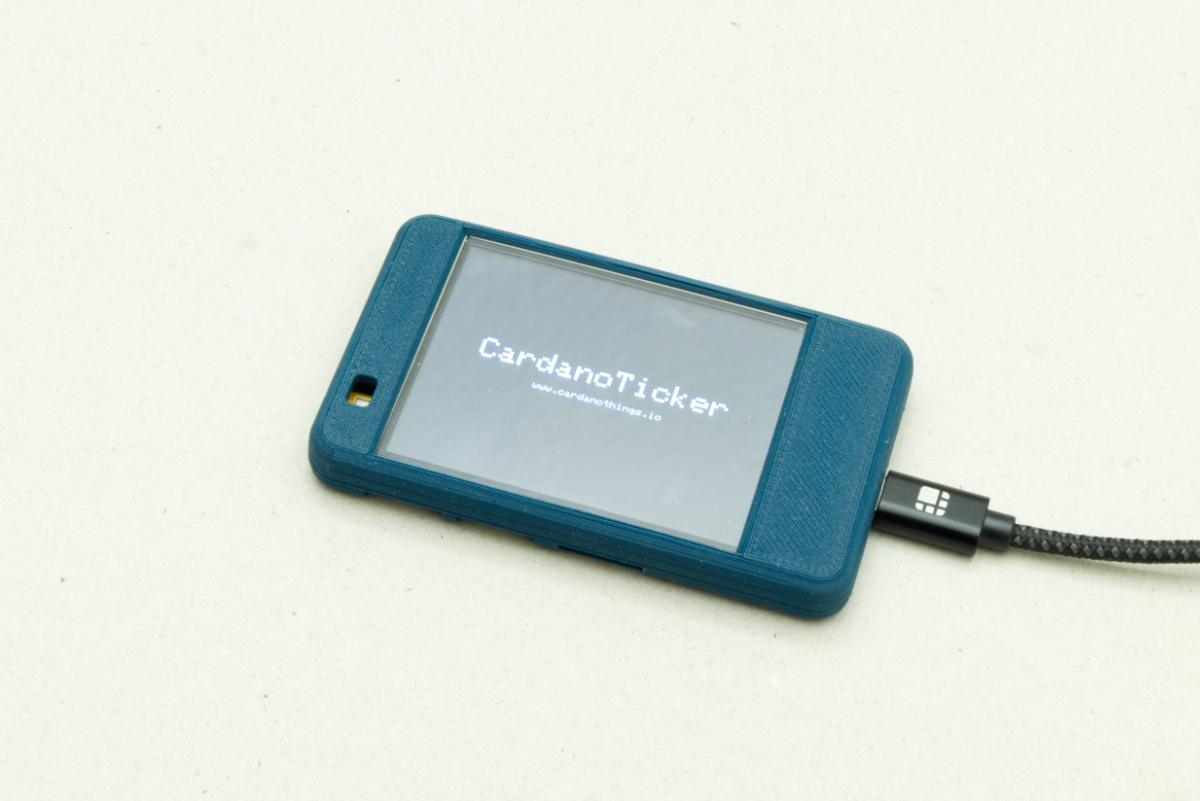
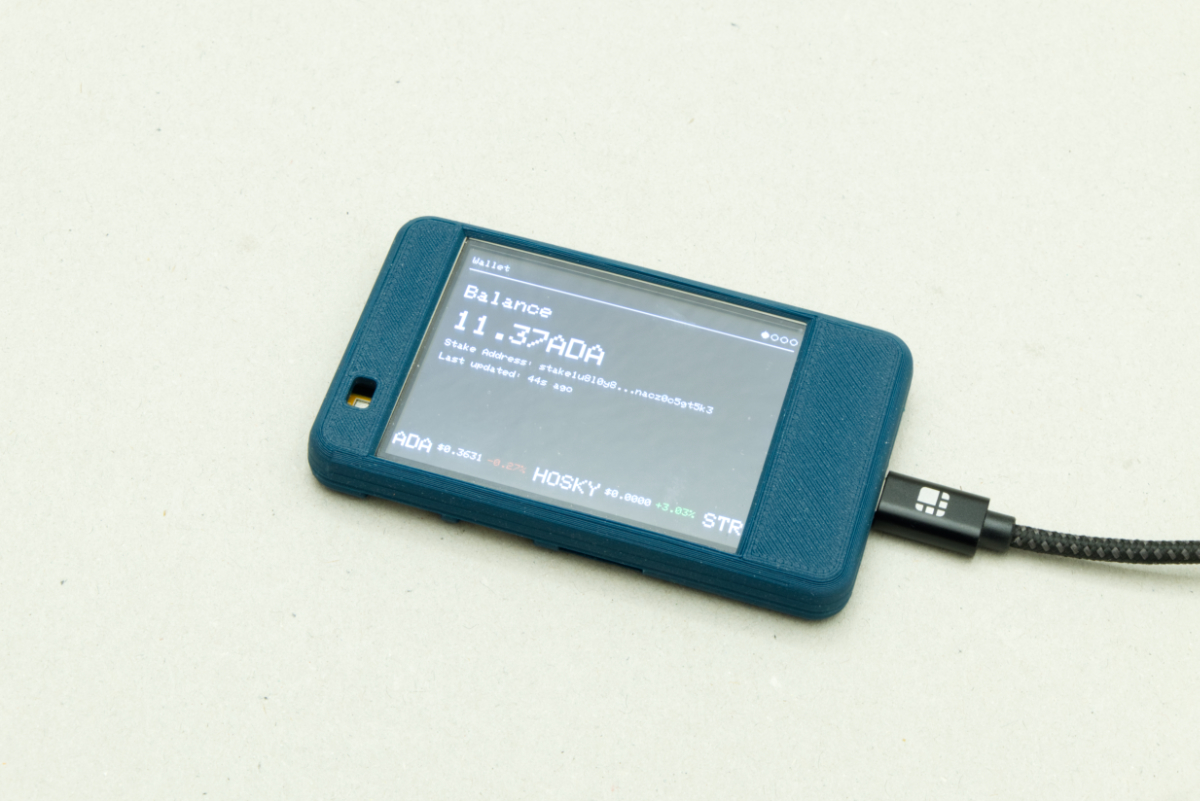
After the start screen ("CardanoTicker") on boot, the ticker rotates between four data screens every 10 seconds: wallet, tokens, NFTs, status.
The wallet screen shows your ADA balance prominently - same idea as the wallet display from Workshop 02.
It shows:
- Balance - ADA balance in size-3 text.
- Stake address - truncated to fit (first 12 + "..." + last 12 chars).
- Last updated - relative time ("2m 30s ago" or "just now").
wallet_screen.cpp:
/**
 * wallet_screen.cpp - Wallet Balance Screen
 *
 * This screen displays your Cardano wallet information:
 * - ADA balance (your main cryptocurrency holdings)
 * - Stake address (your wallet's staking address)
 * - Last update time (when balance was last fetched)
 *
 * Cardano Concepts:
 * - ADA: The native cryptocurrency of Cardano (like Bitcoin for Bitcoin network)
 * - Stake Address: A special address used for staking (earning rewards)
 *   Format: starts with "stake1..." (mainnet) or "stake_test1..." (testnet)
 * - Staking: Locking ADA to help secure the network and earn rewards
 */

#include "wallet_screen.h"
#include "config.h"
#include "data_fetcher.h"
#include "screen_helper.h"
#include <TFT_eSPI.h>

// External reference to TFT display
extern TFT_eSPI tft;

/**
 * Draw the wallet balance screen
 *
 * This is the first screen shown (index 0). It displays your ADA balance
 * prominently, along with your stake address and last update time.
 */
void drawWalletScreen() {
  // Draw header with title and page indicator
  // activeIndex = 0 means this is the first screen
  renderHeader("Wallet", 0);

  // Clear the content area
  clearContentArea();

  // Set default text color
  tft.setTextColor(TFT_WHITE, TFT_BLACK);
  int y = kHeaderHeight + 5;  // Start below header

  // Draw "Balance" label
  tft.setTextSize(2);  // Medium text
  tft.setCursor(10, y);
  tft.print("Balance");

  // Draw ADA balance in large text
  tft.setTextSize(3);  // Large text for emphasis
  y += 30;  // Move down
  tft.setCursor(10, y);
  tft.print(getWalletBalance(), 2);  // Print balance with 2 decimal places
  tft.print("ADA");  // Add "ADA" label

  // Draw stake address (smaller text)
  tft.setTextSize(1);  // Small text
  y += 35;  // Move down
  tft.setCursor(10, y);
  tft.print("Stake Address: ");

  // Stake addresses are long (like 57 characters), so we truncate for display
  // Show first 12 characters + "..." + last 12 characters
  // Example: "stake1u8l0y8...c5gt5k3" instead of full address
  String truncated = stakeAddress.substring(0, 12);  // First 12 chars
  truncated += "...";
  truncated += stakeAddress.substring(stakeAddress.length() - 12);  // Last 12 chars
  tft.print(truncated);

  // Display last updated time
  y += 16;  // Move down
  tft.setCursor(10, y);
  tft.print("Last updated: ");

  // Get timestamp of when balance was last fetched
  const unsigned long lastFetch = getLastKoiosFetchTime();

  if (lastFetch == 0) {
    // Never fetched (device just started or WiFi not connected yet)
    tft.print("Never");
  } else {
    // Calculate time difference
    const unsigned long now = millis();  // Current time
    const unsigned long diffMs = now - lastFetch;  // Difference in milliseconds
    const unsigned long diffSec = diffMs / 1000UL;  // Convert to seconds

    // Format time difference in human-readable way
    if (diffSec < 10) {
      // Less than 10 seconds ago
      tft.print("just now");
    } else if (diffSec < 60) {
      // Less than 1 minute ago - show seconds
      tft.print(diffSec);
      tft.print("s ago");
    } else {
      // 1 minute or more - show minutes and seconds
      const unsigned long minutes = diffSec / 60UL;  // Total minutes
      const unsigned long seconds = diffSec % 60UL;  // Remaining seconds
      tft.print(minutes);
      tft.print("m ");
      if (seconds > 0) {
        tft.print(seconds);
        tft.print("s ");
      }
      tft.print("ago");
    }
  }
}
wallet_screen.h:
/**
 * wallet_screen.h - Header file for wallet display screen
 *
 * This file declares the function to draw the wallet screen, which displays
 * your Cardano wallet balance in ADA and related information.
 */

#ifndef WALLET_SCREEN_H
#define WALLET_SCREEN_H

/**
 * Draw the wallet screen
 *
 * Displays your current ADA wallet balance and related wallet information.
 * This screen is part of the rotating display cycle.
 */
void drawWalletScreen();

#endif
Source:
wallet_screen.cpp
Token screen
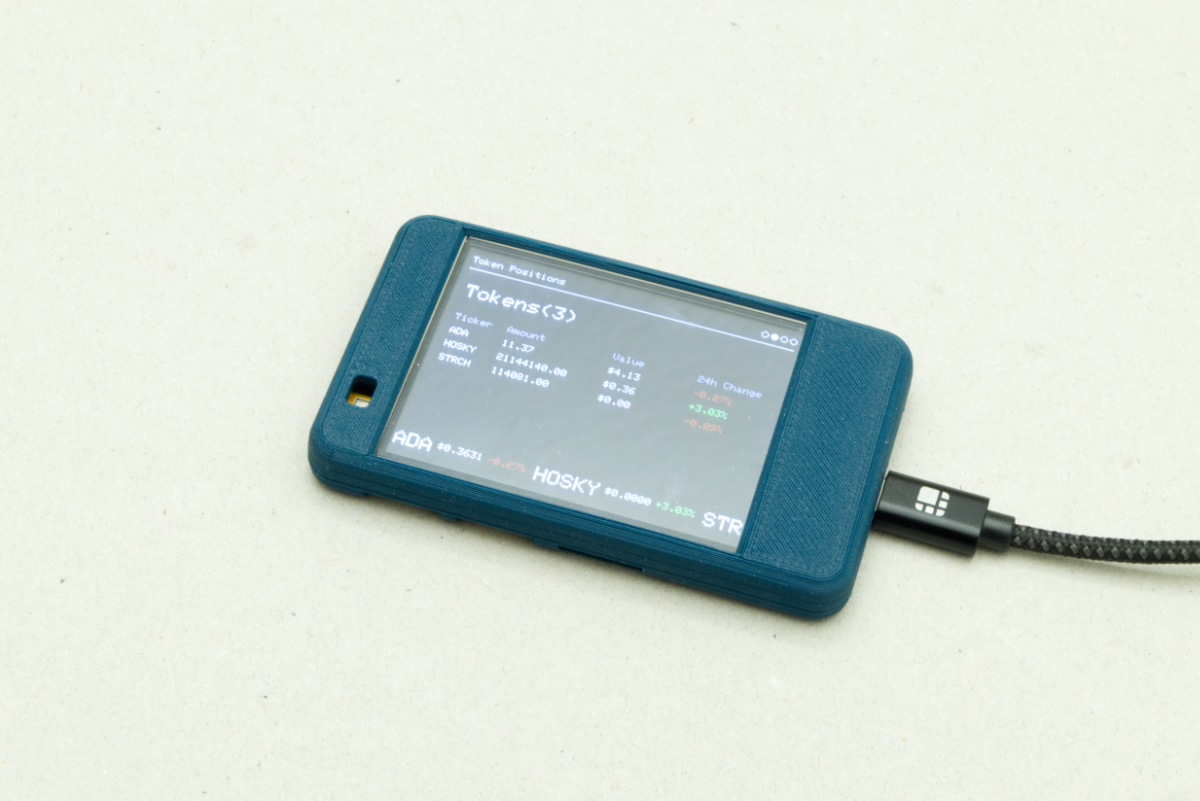
A table of token holdings - one row per token: ticker symbol, amount, total value, 24-hour change.
- Ticker - the token symbol ("MIN", "HOSKY", "ADA").
- Amount - how many you own.
- Value - total USD value.
- 24h change - coloured green (up) / red (down).
token_screen.cpp:
/**
 * token_screen.cpp - Token Holdings Screen
 *
 * This screen displays all the Cardano tokens you own, showing:
 * - Token ticker symbol (e.g., "MIN", "HOSKY")
 * - Amount you own
 * - Total value in USD
 * - 24-hour price change percentage (green if up, red if down)
 *
 * Tokens are custom assets on Cardano blockchain. Unlike ADA (the native
 * currency), tokens are created by projects and can represent anything
 * (governance tokens, meme coins, utility tokens, etc.).
 */

#include "token_screen.h"
#include "data_fetcher.h"
#include "screen_helper.h"
#include <TFT_eSPI.h>

// External reference to TFT display (defined in main .ino file)
extern TFT_eSPI tft;

/**
 * Draw the token positions screen
 *
 * This function renders a table showing all your token holdings.
 * Each row shows one token with its ticker, amount, value, and price change.
 */
void drawTokenScreen() {
  // Draw header with title and page indicator
  // activeIndex = 1 means this is the second screen (0-indexed)
  renderHeader("Token Positions", 1);

  // Clear the content area (erases previous screen's content)
  clearContentArea();

  // Set default text color (white on black)
  tft.setTextColor(TFT_WHITE, TFT_BLACK);

  // Start drawing below the header
  // kHeaderHeight is the height of the header (34px), +5px for spacing
  int y = kHeaderHeight + 5;

  // Draw screen title with token count
  tft.setTextSize(2);                                   // Larger text for title
  tft.setCursor(10, y);                                 // 10px from left edge
  tft.print("Tokens(" + String(getTokenCount()) + ")"); // e.g., "Tokens(5)"
  y += 35; // Move down for next line

  // Get token count (already limited to MAX_DISPLAY_ITEMS = 8)
  const int tokenCount = getTokenCount();
  const int displayCount = tokenCount; // We can display all tokens (max 8)

  // Switch to smaller text for the table
  tft.setTextSize(1);

  // Draw column headers
  tft.setTextColor(TFT_DARKGREY, TFT_BLACK); // Gray text for headers

  tft.setTextSize(1);
  tft.setCursor(10, y); // "Ticker" column
  tft.print("Ticker");
  tft.setCursor(60, y); // "Amount" column
  tft.print("Amount");
  tft.setCursor(160, y); // "Value" column
  tft.print("Value");
  tft.setCursor(240, y); // "24h Change" column
  tft.print("24h Change");
  y += 16;                                // Move down to start data rows
  tft.setTextColor(TFT_WHITE, TFT_BLACK); // Back to white for data

  // Loop through each token and draw a row
  for (int i = 0; i < displayCount; ++i) {
    // Get token data from data fetcher
    TokenInfo token = getToken(i);

    // Truncate token name if too long (so it fits on screen)
    String displayName = token.ticker;
    if (displayName.length() > 20) {
      // If longer than 20 characters, show first 15 + "..."
      displayName = displayName.substring(0, 15) + "...";
    }

    // Draw token ticker (left column)
    tft.setCursor(10, y);
    tft.print(displayName);

    // Draw amount you own (second column)
    tft.setCursor(60, y);
    tft.print(token.amount, 2); // Print with 2 decimal places

    // Draw total value in USD (third column)
    tft.setCursor(160, y);
    tft.print("$" + String(token.value, 2)); // e.g., "$123.45"

    // Draw 24-hour price change (fourth column)
    tft.setCursor(240, y);

    // Color code: green for positive change, red for negative
    if (token.change24h >= 0) {
      tft.setTextColor(TFT_GREEN, TFT_BLACK); // Green = price went up
    } else {
      tft.setTextColor(TFT_RED, TFT_BLACK); // Red = price went down
    }

    // Show change with + or - sign
    // Note: String() already includes the minus sign for negative numbers
    // So we only need to add "+" for positive numbers
    // Example: String(5.67, 2) = "5.67" (we add "+" to make "+5.67")
    //          String(-5.67, 2) = "-5.67" (already has minus, no need to add
    //          "-")
    tft.print((token.change24h >= 0 ? "+" : "") + String(token.change24h, 2));
    tft.print("%");

    // Reset text color back to white
    tft.setTextColor(TFT_WHITE, TFT_BLACK);

    // Move down for next row
    y += 16;

    // Safety check: stop if we're running out of screen space
    // Don't draw over the ticker at the bottom
    if (y > tft.height() - kTickerHeight - 10) {
      break; // Exit loop early
    }
  }

  // If there are more tokens than we can display, show a message
  // (This shouldn't happen since we limit to 8, but good to have)
  if (tokenCount > displayCount) {
    y += 4; // Add some spacing
    tft.setCursor(10, y);
    tft.print("... and ");
    tft.print(tokenCount - displayCount);
    tft.print(" more");
  }
}
token_screen.h:
/**
 * token_screen.h - Header file for token display screen
 *
 * This file declares the function to draw the token screen, which displays
 * information about the Cardano tokens in your wallet, including token names,
 * quantities, values, and 24-hour price changes.
 */

#ifndef TOKEN_SCREEN_H
#define TOKEN_SCREEN_H

/**
 * Draw the token screen
 *
 * Displays your Cardano token holdings with their values and price changes.
 * This screen is part of the rotating display cycle.
 */
void drawTokenScreen();

#endif
Source:
token_screen.cpp
NFT screen
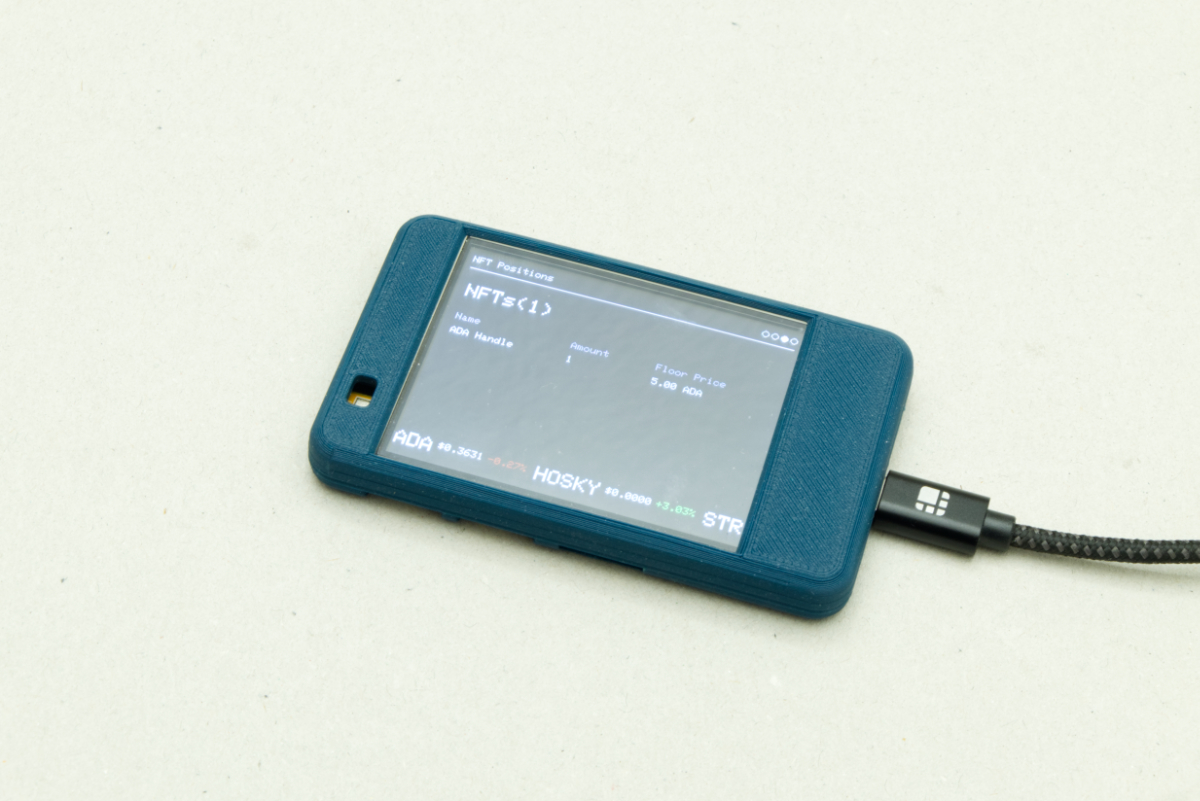
A table of NFT collections - one row per collection: name, count, floor price.
- Name - collection name ("Cardano Punks", "SpaceBudz").
- Amount - how many NFTs you own from the collection.
- Floor price - current lowest selling price for the collection in ADA.
nft_screen.cpp:
/**
 * nft_screen.cpp - NFT Collection Screen
 *
 * This screen displays all your NFT collections, showing:
 * - Collection name (e.g., "Cardano Punks", "SpaceBudz")
 * - Number of NFTs you own from that collection
 * - Floor price (lowest current selling price) in ADA
 *
 * Important Cardano NFT concepts:
 * - NFTs are grouped by "Policy ID" (collection identifier)
 * - If you own 3 NFTs from the same collection, they're shown as one entry
 * - Floor price = the cheapest NFT from that collection currently for sale
 * - Floor price helps you understand the collection's market value
 */

#include "nft_screen.h"
#include "data_fetcher.h"
#include "screen_helper.h"
#include <TFT_eSPI.h>

// External reference to TFT display
extern TFT_eSPI tft;

/**
 * Draw the NFT positions screen
 *
 * This function renders a table showing all your NFT collections.
 * Each row shows one collection with its name, how many you own, and floor
 * price.
 */
void drawNFTScreen() {
  // Draw header with title and page indicator
  // activeIndex = 2 means this is the third screen (0-indexed)
  renderHeader("NFT Positions", 2);

  // Clear the content area
  clearContentArea();

  // Set default text color
  tft.setTextColor(TFT_WHITE, TFT_BLACK);

  // Start drawing below header
  int y = kHeaderHeight + 5;

  // Draw screen title with NFT collection count
  tft.setTextSize(2); // Larger text
  tft.setCursor(10, y);
  tft.print("NFTs(" + String(getNftCount()) + ")"); // e.g., "NFTs(3)"
  y += 35;                                          // Move down

  // Get NFT collection count (already limited to MAX_DISPLAY_ITEMS = 8)
  const int nftCount = getNftCount();
  const int displayCount = nftCount; // We can display all collections (max 8)

  // Switch to smaller text for table
  tft.setTextSize(1);

  // Draw column headers
  tft.setTextColor(TFT_DARKGREY, TFT_BLACK); // Gray for headers

  tft.setTextSize(1);
  tft.setCursor(10, y); // "Name" column
  tft.print("Name");
  tft.setCursor(120, y); // "Amount" column
  tft.print("Amount");
  tft.setCursor(200, y); // "Floor Price" column
  tft.print("Floor Price");
  y += 16;                                // Move down to data rows
  tft.setTextColor(TFT_WHITE, TFT_BLACK); // Back to white

  // Loop through each NFT collection and draw a row
  for (int i = 0; i < displayCount; ++i) {
    // Get NFT collection data from data fetcher
    NFTInfo nft = getNFT(i);

    // Truncate collection name if too long (so it fits on screen)
    String displayName = nft.name;
    if (displayName.length() > 18) {
      // If longer than 18 characters, show first 15 + "..."
      displayName = displayName.substring(0, 15) + "...";
    }

    // Draw collection name (left column)
    tft.setCursor(10, y);
    tft.print(displayName);

    // Draw number of NFTs you own (middle column)
    tft.setCursor(120, y);
    tft.print(nft.amount, 0); // Print as integer (no decimals for count)

    // Draw floor price (right column)
    tft.setCursor(200, y);
    if (nft.floorPrice > 0.0f) {
      // If we have floor price data, show it in ADA
      tft.print(String(nft.floorPrice, 2) + " ADA"); // e.g., "50.25 ADA"
    } else {
      // If floor price not available yet (still fetching), show "N/A"
      tft.print("N/A");
    }

    // Move down for next row
    y += 16;

    // Safety check: stop if running out of screen space
    if (y > tft.height() - kTickerHeight - 10) {
      break; // Exit loop early
    }
  }

  // If there are more collections than we can display, show a message
  // (This shouldn't happen since we limit to 8, but good to have)
  if (nftCount > displayCount) {
    y += 4; // Add spacing
    tft.setCursor(10, y);
    tft.print("... and ");
    tft.print(nftCount - displayCount);
    tft.print(" more");
  }
}
nft_screen.h:
/**
 * nft_screen.h - Header file for NFT display screen
 *
 * This file declares the function to draw the NFT screen, which displays
 * information about the NFT collections in your wallet, including collection
 * names, quantities owned, and floor prices.
 */

#ifndef NFT_SCREEN_H
#define NFT_SCREEN_H

/**
 * Draw the NFT screen
 *
 * Displays your NFT collections with their floor prices and quantities.
 * This screen is part of the rotating display cycle.
 */
void drawNFTScreen();

#endif
Source:
nft_screen.cpp
Status screen
Technical info about the device and network - useful for debugging.
- Network status - "Connected" / "Offline".
- Signal strength - dBm (closer to 0 is better).
- IP address - local network address.
- MAC address - hardware identifier.
- Uptime - "2d 5h 30m 15s".
status_screen.cpp:
/**
 * status_screen.cpp - System Status Screen
 *
 * This screen displays device and network information:
 * - WiFi connection status
 * - WiFi signal strength (RSSI)
 * - IP address (your device's address on the network)
 * - MAC address (unique hardware identifier)
 * - Uptime (how long the device has been running)
 *
 * This is useful for debugging connection issues and monitoring device health.
 */

#include "status_screen.h"
#include "screen_helper.h"
#include "wifi_manager.h"
#include <TFT_eSPI.h>
#include <WiFi.h>

// External reference to TFT display
extern TFT_eSPI tft;

/**
 * Draw the system status screen
 *
 * This is the last screen (index 3). It shows technical information about
 * the device and network connection.
 */
void drawStatusScreen() {
  // Draw header with title and page indicator
  // activeIndex = 3 means this is the fourth (last) screen
  renderHeader("System", 3);

  // Clear the content area
  clearContentArea();

  // Set default text color
  tft.setTextColor(TFT_WHITE, TFT_BLACK);

  // Gather all status information
  const bool connected = wifiManagerIsConnected();  // Is WiFi connected?
  const int32_t rssi = connected ? WiFi.RSSI() : 0;  // Signal strength (only if connected)
  const IPAddress ipAddr = connected ? WiFi.localIP() : IPAddress(0, 0, 0, 0);  // IP address
  const String macAddr = WiFi.macAddress();  // MAC address (always available)

  // Calculate uptime (how long device has been running)
  const unsigned long uptimeMs = millis();  // Milliseconds since startup
  const unsigned long uptimeSec = uptimeMs / 1000UL;  // Convert to seconds

  // Break down uptime into days, hours, minutes, seconds
  const unsigned long days = uptimeSec / 86400UL;  // 86400 seconds = 1 day
  const unsigned long hours = (uptimeSec % 86400UL) / 3600UL;  // Remaining hours
  const unsigned long minutes = (uptimeSec % 3600UL) / 60UL;  // Remaining minutes
  const unsigned long seconds = uptimeSec % 60UL;  // Remaining seconds

  // Start drawing below header
  int y = kHeaderHeight + 5;

  // Draw "Network" label
  tft.setTextSize(2);
  tft.setCursor(10, y);
  tft.print("Network");

  // Draw connection status in large text
  tft.setTextSize(3);  // Large text
  y += 30;
  tft.setCursor(10, y);
  tft.print(connected ? "Connected" : "Offline");  // Show status

  // Draw WiFi signal strength
  tft.setTextSize(1);  // Small text
  y += 35;
  tft.setCursor(10, y);
  tft.print("Signal: ");
  if (connected) {
    // RSSI = Received Signal Strength Indicator
    // Measured in dBm (decibels relative to milliwatt)
    // Typical range: -30 (excellent) to -90 (poor)
    // Negative numbers are normal - closer to 0 is better
    tft.print(String(rssi) + " dBm");
  } else {
    tft.print("N/A");  // Not available if not connected
  }

  // Draw IP address
  y += 16;
  tft.setCursor(10, y);
  tft.print("IP: ");
  // IP address = Internet Protocol address
  // This is your device's address on your local network
  // Format: XXX.XXX.XXX.XXX (e.g., 192.168.1.100)
  tft.print(ipAddr.toString());

  // Draw MAC address
  y += 16;
  tft.setCursor(10, y);
  tft.print("MAC: ");
  // MAC address = Media Access Control address
  // This is a unique identifier for your device's network hardware
  // Format: XX:XX:XX:XX:XX:XX (e.g., AA:BB:CC:DD:EE:FF)
  // Unlike IP address, MAC address never changes
  tft.print(macAddr);

  // Draw uptime
  y += 16;
  tft.setCursor(10, y);
  tft.print("Uptime: ");
  // Display uptime in human-readable format: "Xd Xh Xm Xs"
  tft.print(days);
  tft.print("d ");  // Days
  tft.print(hours);
  tft.print("h ");  // Hours
  tft.print(minutes);
  tft.print("m ");  // Minutes
  tft.print(seconds);
  tft.print("s");   // Seconds
}
status_screen.h:
/**
 * status_screen.h - Header file for status display screen
 *
 * This file declares the function to draw the status screen, which displays
 * system information such as WiFi connection status, last update times,
 * and other diagnostic information.
 */

#ifndef STATUS_SCREEN_H
#define STATUS_SCREEN_H

/**
 * Draw the status screen
 *
 * Displays system status information including network connectivity,
 * API fetch times, and other diagnostic data.
 * This screen is part of the rotating display cycle.
 */
void drawStatusScreen();

#endif
Source:
status_screen.cpp
Scrolling ticker
The bottom strip continuously scrolls token prices horizontally - stock-market-style. Per token:
- Ticker symbol in larger text ("MIN").
- Price per token in USD ("$0.0123").
- 24h change colour-coded ("+5.67%").
ticker.cpp:
/**
 * ticker.cpp - Scrolling Token Ticker
 *
 * This file implements a scrolling ticker at the bottom of the screen that
 * displays token prices continuously. Think of it like a stock market ticker
 * - it scrolls horizontally showing token symbols, prices, and 24h changes.
 *
 * How it works:
 * 1. We draw all token information into an off-screen buffer (sprite)
 * 2. We draw the content twice (side by side) to create seamless looping
 * 3. We scroll the viewport left, and when we reach the end, we loop back
 * 4. This creates an endless scrolling effect
 *
 * Technical concepts:
 * - Sprite: An off-screen buffer we draw to, then push to screen all at once
 * - This reduces flicker compared to drawing directly to the screen
 * - Seamless looping: Drawing content twice so when one copy scrolls off,
 *   the second copy is already visible, creating infinite scroll
 */

#include "ticker.h"
#include "data_fetcher.h"
#include <Arduino.h>
#include <TFT_eSPI.h>

// External reference to TFT display (defined in main .ino file)
extern TFT_eSPI tft;

// Create sprite for smooth scrolling
// A sprite is an off-screen buffer - we draw to it, then push it to the display
// This reduces flicker because we update the whole area at once
TFT_eSprite scrollSprite = TFT_eSprite(&tft);

// Scroll area configuration
const int scrollAreaHeight = 30;  // Height of ticker area at bottom (in pixels)
                                   // Must match kTickerHeight in screen_helper.h
const int yPos = 4;                // Vertical position within sprite (4px from top)
const int scrollSpeed = 2;         // How many pixels to scroll per update
                                   // Higher = faster scroll, Lower = slower scroll

// Scrolling state variables
int scrollX = 0;      // Current horizontal scroll position (in pixels)
                      // This tracks how far we've scrolled to the left
int contentWidth = 0; // Total width of all token content (in pixels)
                      // Used to calculate when to loop back to start

/**
 * Calculate the price per token
 *
 * The data fetcher gives us total value (value) and amount owned (amount).
 * To show price per token, we divide: price = total_value / amount
 *
 * @param token The token information structure
 * @return Price per token in USD, or 0 if amount is 0
 *
 * Example: If you own 100 tokens worth $50 total, price per token = $0.50
 */
static float getTokenPrice(const TokenInfo& token) {
  // Avoid division by zero (if amount is 0, return 0)
  return (token.amount > 0.0f) ? (token.value / token.amount) : 0.0f;
}

/**
 * Calculate total width of all token content
 *
 * This function measures how wide all the token information is when displayed.
 * We need this to know when to loop the scroll back to the beginning.
 *
 * We measure each piece of text individually because different text sizes
 * and lengths take up different amounts of space.
 */
void calculateContentWidth() {
  contentWidth = 0;  // Start with zero width
  const int tokenCount = getTokenCount();

  // Loop through each token and measure its width
  for (int i = 0; i < tokenCount; i++) {
    TokenInfo token = getToken(i);
    float price = getTokenPrice(token);

    // Measure ticker symbol width (larger text, size 2)
    tft.setTextSize(2);
    contentWidth += tft.textWidth(token.ticker) + 4;  // Add 4px spacing after ticker

    // Measure price width (smaller text, size 1)
    tft.setTextSize(1);
    String priceStr = "$" + String(price, 4);  // Format: "$0.1234"
    contentWidth += tft.textWidth(priceStr) + 4;  // Add 4px spacing after price

    // Measure 24h change width (smaller text, size 1)
    // Note: String() already includes the minus sign for negative numbers
    String changeStr = (token.change24h >= 0 ? "+" : "") +
                       String(token.change24h, 2) + "%";  // Format: "+5.67%" or "-2.34%"
    contentWidth += tft.textWidth(changeStr) + 8;  // Add 8px spacing after change (extra space)
  }

  // Now contentWidth = total width needed to display all tokens
  // We'll draw this content twice (side by side) for seamless looping
}

/**
 * Draw all token information at a given horizontal position
 *
 * This function draws all tokens into the sprite buffer starting at xPos.
 * We call this twice with different xPos values to create seamless looping.
 *
 * @param xPos The horizontal position to start drawing at (can be negative)
 *
 * What we draw for each token:
 * 1. Ticker symbol (large text, e.g., "MIN")
 * 2. Price per token (small text, e.g., "$0.0123")
 * 3. 24h change (small text, colored green/red, e.g., "+5.67%")
 */
void drawContentLine(int xPos) {
  const int tokenCount = getTokenCount();

  // Draw each token in sequence
  for (int i = 0; i < tokenCount; i++) {
    TokenInfo token = getToken(i);
    float price = getTokenPrice(token);

    // Draw token ticker symbol (larger, more prominent)
    scrollSprite.setTextSize(2);  // Size 2 = larger text
    scrollSprite.setTextColor(TFT_WHITE, TFT_BLACK);
    scrollSprite.drawString(token.ticker, xPos, yPos);  // Draw at current position
    xPos += scrollSprite.textWidth(token.ticker) + 4;  // Move xPos right by ticker width + spacing

    // Draw token price (smaller text, slightly lower for visual alignment)
    scrollSprite.setTextSize(1);  // Size 1 = smaller text
    String priceStr = "$" + String(price, 4);  // Format: "$0.1234"
    scrollSprite.drawString(priceStr, xPos, yPos + 2);  // +2px down for alignment
    xPos += scrollSprite.textWidth(priceStr) + 4;  // Move xPos right

    // Draw 24h price change with color coding
    // Format: "+5.67%" for positive, "-2.34%" for negative
    // Note: String() already includes the sign for negative numbers
    String changeStr = (token.change24h >= 0 ? "+" : "") +
                       String(token.change24h, 2) + "%";  // Format: "+5.67%" or "-2.34%"

    // Color code: green = price went up, red = price went down
    if (token.change24h >= 0) {
      scrollSprite.setTextColor(TFT_GREEN, TFT_BLACK);  // Green for gains
    } else {
      scrollSprite.setTextColor(TFT_RED, TFT_BLACK);    // Red for losses
    }
    scrollSprite.drawString(changeStr, xPos, yPos + 2);  // Draw change
    xPos += scrollSprite.textWidth(changeStr) + 8;  // Move xPos right (extra spacing)

    // After this loop, xPos has moved to the right of all tokens
    // This is how we know where to draw the second copy for seamless looping
  }
}

/**
 * Initialize the ticker display
 *
 * This function sets up the scrolling ticker. It's called once at startup
 * in setup(). It creates the sprite buffer and calculates content width.
 */
void initTicker() {
  // Fill entire screen with black (clean slate)
  tft.fillScreen(TFT_BLACK);

  // Configure sprite for smooth scrolling
  // 16-bit color depth = 65,536 colors (full color support)
  // Higher color depth = better quality but uses more memory
  scrollSprite.setColorDepth(16);

  // Create the sprite buffer
  // Width = full screen width, Height = ticker area height (30px)
  // This creates an off-screen buffer we can draw to
  scrollSprite.createSprite(tft.width(), scrollAreaHeight);

  // Calculate how wide all the token content is
  // This tells us when to loop the scroll back to the beginning
  calculateContentWidth();

  Serial.println("Token scroll display initialized!");
}

/**
 * Update the ticker display (call this in loop)
 *
 * This function is called repeatedly from loop() to create the scrolling
 * animation. Each call:
 * 1. Clears the sprite
 * 2. Draws content at current scroll position
 * 3. Draws content again (offset) for seamless looping
 * 4. Pushes sprite to screen
 * 5. Updates scroll position
 *
 * Seamless looping trick:
 * - We draw the content twice, side by side
 * - When the first copy scrolls off the left, the second copy is already visible
 * - When we reach the end, we reset scrollX to 0 and it looks continuous
 */
void updateTicker() {
  // Clear the sprite buffer with black (erase previous frame)
  scrollSprite.fillSprite(TFT_BLACK);

  // Draw first copy of content
  // -scrollX means we're scrolling left (negative X moves content left)
  // Example: if scrollX = 50, we draw at x = -50, which shows content
  //          that's 50 pixels to the left (already scrolled)
  drawContentLine(-scrollX);

  // Draw second copy of content for seamless looping
  // We offset it by contentWidth so it appears right after the first copy
  // When first copy scrolls off left, second copy is already visible
  drawContentLine(-scrollX + contentWidth);

  // Push the sprite to the display
  // This updates the screen all at once (reduces flicker)
  // Position: x=0 (left edge), y=bottom of screen minus ticker height
  scrollSprite.pushSprite(0, tft.height() - scrollAreaHeight);

  // Update scroll position (move left by scrollSpeed pixels)
  scrollX += scrollSpeed;

  // Check if we've scrolled past all the content
  // If so, reset to 0 to create the loop effect
  if (scrollX >= contentWidth) {
    scrollX = 0;  // Loop back to beginning
  }

  // Small delay to control scroll speed
  // Without this, scrolling would be too fast
  // 30ms = ~33 updates per second (smooth animation)
  delay(30);
}
ticker.h:
/**
 * ticker.h - Header file for scrolling ticker
 *
 * This file declares the functions for the scrolling token price ticker
 * that appears at the bottom of the screen.
 */

#ifndef TICKER_H
#define TICKER_H

#include <Arduino.h>

/**
 * Initialize the ticker display
 *
 * Sets up the sprite buffer and calculates content width.
 * Call this once in setup().
 */
void initTicker();

/**
 * Update the ticker display
 *
 * Draws the scrolling ticker and updates the scroll position.
 * Call this repeatedly in loop() to create smooth scrolling animation.
 */
void updateTicker();

#endif
Source:
ticker.cpp
Putting it all together
- Download the code from the GitHub repo.
- Configure addresses - edit
config.cppwith your stake address and wallet address. - Set up WiFi - copy
secrets.h.exampletosecrets.hand fill in. - Get an API key - Cexplorer.io key into
config.cpp. - Install libraries - TFT_eSPI, ArduinoJson, WiFi (you already have these from earlier workshops).
- Upload and run - flash to your ESP32 and watch.
You should already have all of these from previous workshops:
- TFT_eSPI - Workshop 02 (display).
- ArduinoJson - Workshop 02 (JSON parsing).
- WiFi - built into ESP32.
- HTTPClient - built into ESP32.
What's next?
Some directions:
- Special effects when your balance changes.
- Another screen for your own NFT project.
- For more advanced graphics, look into LVGL - beautiful UIs for any MCU/MPU/display.
Further Resources
- TFT_eSPI Library - graphics for ESP8266 / ESP32 TFT displays.
- ArduinoJson Library - JSON parsing.
- Koios API Documentation - free Cardano API.
- MinSwap - Cardano DEX (token + NFT positions).
- Cexplorer.io - explorer + free-tier API for NFT collection data.
- LVGL - advanced embedded GUI library.
Adapted from the CardanoThings workshop series, originally produced under Project Catalyst Fund 11. Source code: github.com/CardanoThings/Workshops/Workshop-04.