Building the Backend
The capstone for the IoT-on-Cardano course: the backend that ties the frontend, the QR code on the TFT, and on-chain confirmation together.
Before we start
Create a second Cardano wallet so you can pay from one and listen on the other. You already know how to create a wallet from Workshop 01.
As of writing, no mobile wallet correctly attaches the exact lovelace amount on a CIP-13 payment URI. To exercise the on-chain confirmation flow, send the exact lovelace amount manually with a desktop wallet. Track progress in the CIP-0013 spec.
Core concepts
Identifying the payment request
To match a confirmed transaction back to a payment request, encode the request ID in the lovelace amount. Instead of requesting 10 ADA, request 10.000001 ADA - the trailing lovelace is the request ID. When you find a UTxO with the exact lovelace amount (10000001), you've matched the request.
This is the simplest possible approach. It relies on individual lovelace amounts being added on top of the requested amount, and breaks if the user pays a different amount or if multiple UTxOs share the expected amount. You can harden this by also filtering on transaction timestamp.
Listening for the transaction
There's no way to know the transaction hash up-front, or even whether the user scanned the QR. So we poll for a UTxO with the expected lovelace amount appearing on the recipient address.
We use the Koios /address_utxos endpoint - a POST with the address in the body:
{
  "_addresses": [
    "addr_test1qq3y2eqxprkk0dz2tyeuhav4hj3fem4duersn7w6eees9ru55stym27wkwyqw3z6uwr57plm22pyse00u9atdyzecg8skz0jec"
  ]
}
Response (truncated):
[
  {
    "tx_hash": "7ca6e052da9fa365ae156b40e5d6c208b808c3faa9985a8b1562ef9136fbdbd5",
    "tx_index": 0,
    "address": "addr_test1qq3y2eqxprkk0dz2tyeuhav4hj3fem4duersn7w6eees9ru55stym27wkwyqw3z6uwr57plm22pyse00u9atdyzecg8skz0jec",
    "value": "15140930",
    "stake_address": "stake_test1uz22g9jd408t8zq8g3dw8p60qla49qjgvhh7z74kjpvuyrctlwf4m",
    "payment_cred": "2245640608ed67b44a5933cbf595bca29ceeade64709f9dace73028f",
    "epoch_no": 258,
    "block_height": 4223127,
    "block_time": 1765568200,
    "datum_hash": null,
    "inline_datum": null,
    "reference_script": null,
    "asset_list": null,
    "is_spent": false
  }
]
We can filter directly for the expected lovelace amount via Koios's horizontal filtering:
https://preprod.koios.rest/api/v1/address_utxos?value=eq.13000004
Returns only UTxOs of value 13000004 lovelace - 13 ADA requested + 4 lovelace request ID.
When the API returns a UTxO for that query, the payment is confirmed: render confirmation on the TFT, update the JSON store with the transaction hash, stop listening for that request.
A CIP is in flight (CIP-0157, currently being drafted) for adding individual metadata to CIP-13 payment URIs (such as a unique payment ID), which would replace this lovelace-encoding hack with proper IDs.
Putting it all together
Same setup as the basic webserver from the first lesson, with extra logic added in the main sketch and secrets.h. The WiFi manager is unchanged.
cardano-pos.ino:
// Include necessary libraries
#include <Arduino.h>
#include <TFT_eSPI.h>

// Include our custom header files
#include "secrets.h"        // WiFi credentials (not in git)
#include "transaction_qr.h" // Transaction QR code display
#include "web_server.h"     // HTTP web server for serving files
#include "wifi_manager.h"   // WiFi connection management

// Display object - handles communication with the TFT screen
TFT_eSPI display = TFT_eSPI();

void setup() {
  // Initialize serial communication for debugging
  // Serial communication lets us send messages to the computer via USB
  // 115200 is the baud rate (speed of communication)
  // You can view these messages in the Arduino IDE Serial Monitor
  Serial.begin(115200);
  delay(1000); // Give serial monitor time to connect

  // Set up WiFi connection
  // WIFI_SSID is your WiFi network name
  // WIFI_PASSWORD is your WiFi password
  // These are defined in secrets.h (which you should create from
  // secrets.h.example)
  wifiManagerSetup(WIFI_SSID, WIFI_PASSWORD);

  // Wait for WiFi connection (with timeout)
  // We need WiFi to serve web pages, so we wait here
  Serial.println("Waiting for WiFi connection...");
  const unsigned long wifiTimeout =
      30000; // 30 seconds timeout (in milliseconds)
  const unsigned long wifiStart = millis(); // Record when we started waiting

  // Keep checking if WiFi is connected, but don't wait forever
  // millis() returns the number of milliseconds since the device started
  while (!wifiManagerIsConnected() && (millis() - wifiStart) < wifiTimeout) {
    wifiManagerLoop(); // Check WiFi status and try to connect
    delay(100);        // Wait 100ms before checking again (don't waste CPU)
  }

  // Start web server if WiFi is connected
  if (wifiManagerIsConnected()) {
    webServerSetup();
  } else {
    Serial.println("WiFi connection failed - web server not started");
  }

  // Initialize the display
  display.begin();

  // Invert display colors (useful for certain display types)
  display.invertDisplay(true);

  // Set display rotation (0 = portrait, 1-3 = other orientations)
  display.setRotation(0);

  // Fill the entire screen with black background
  display.fillScreen(TFT_BLACK);

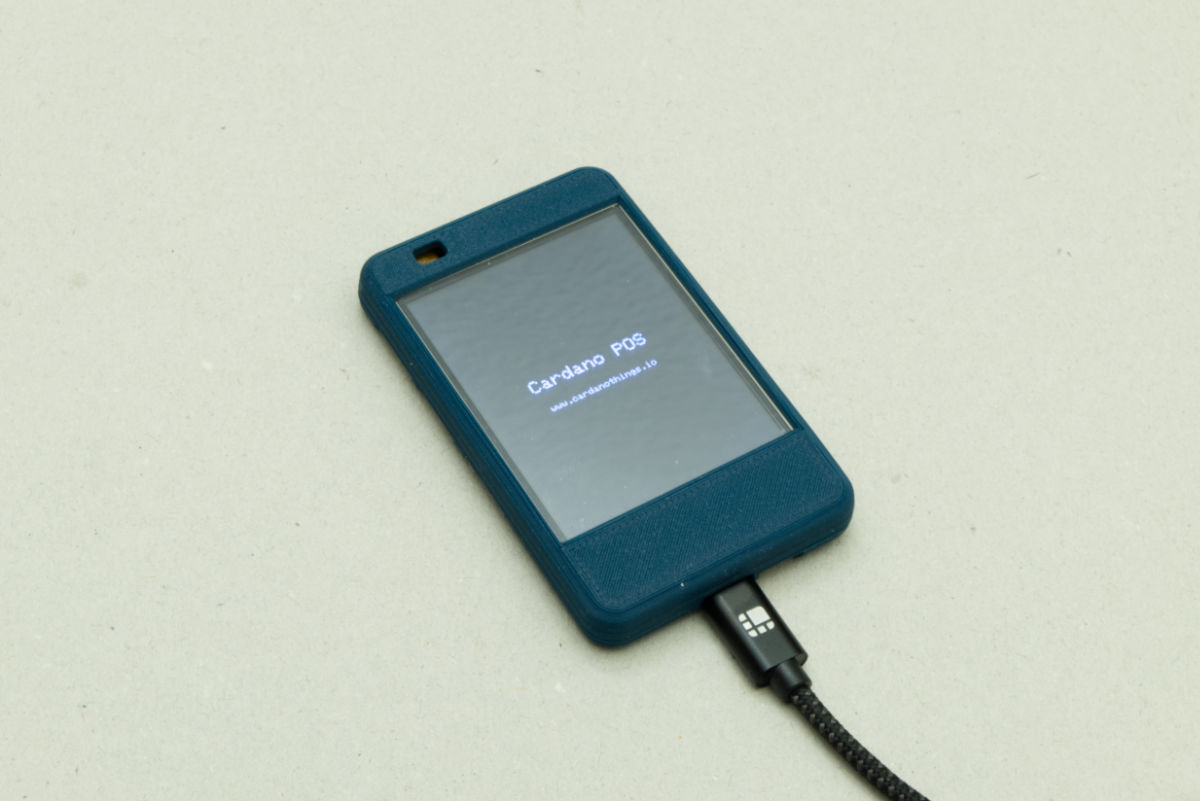
  // Welcome Message
  display.setTextColor(TFT_WHITE);

  // Center "Cardano POS" text using MC_DATUM (Middle Center datum)
  display.setTextSize(2);
  display.setTextDatum(MC_DATUM);
  display.drawString("Cardano POS", display.width() / 2,
                     display.height() / 2 - 10);

  // Center "www.cardanothings.io" text below
  display.setTextSize(1);
  display.drawString("www.cardanothings.io", display.width() / 2,
                     display.height() / 2 + 20);
  delay(5000);
  display.fillScreen(TFT_BLACK);

  // Initialize transaction QR display
  transactionQRInit(display);

  // Register callback to display QR code when new transaction is created
  setTransactionCreatedCallback(displayNewTransactionQR, &display);
}

void loop() {
  // Keep WiFi connection alive and check for reconnection if needed
  // This needs to be called regularly to maintain the connection
  wifiManagerLoop();

  // Handle web server requests (runs asynchronously, but we call loop for
  // consistency)
  if (wifiManagerIsConnected() && !webServerIsRunning()) {
    // If WiFi just reconnected, start the server
    webServerSetup();
  }
  webServerLoop();

  // Update transaction QR display and check on-chain status
  transactionQRUpdate(display);
}
secrets.h.example:
/**
 * secrets.h.example - Template file for sensitive configuration values
 *
 * This is a template file showing what secrets need to be configured.
 * To use this file:
 * 1. Copy this file to secrets.h (secrets.h is in .gitignore and won't be committed)
 * 2. Fill in your actual WiFi credentials and API keys
 * 3. Never commit secrets.h to version control!
 *
 * IMPORTANT: Keep your secrets.h file private and never share it publicly.
 */

#ifndef SECRETS_H
#define SECRETS_H

// Your WiFi network name (SSID)
// The name of the WiFi network your device should connect to
#define WIFI_SSID ""

// Your WiFi network password
// The password required to connect to your WiFi network
#define WIFI_PASSWORD ""

// Your Cardano payment address
// The address where payments should be sent
// Format: addr1... or addr_test1...
#define PAYMENT_ADDRESS ""

// Koios API URL for checking transactions
// Preprod: https://preprod.koios.rest/api/v1/address_utxos
// Mainnet: https://api.koios.rest/api/v1/address_utxos
#define KOIOS_API_URL "https://preprod.koios.rest/api/v1/address_utxos"

#endif
Source:
cardano-pos.ino
Add WiFi credentials, your payment address, and the Koios endpoint to secrets.h.
Building the webserver
Now build the webserver that serves the frontend, creates new payment requests, and stores them in a JSON file.
web_server.h:
#ifndef WEB_SERVER_H
#define WEB_SERVER_H

#include <Arduino.h>

// Forward declaration
class TFT_eSPI;

// Callback function type for new transaction notifications
// transactionId: ID of the transaction
// lovelaceAmount: Amount in lovelace (with ID already added)
typedef void (*TransactionCallback)(TFT_eSPI* display, int transactionId, uint64_t lovelaceAmount);

// Set callback for when a new transaction is created
void setTransactionCreatedCallback(TransactionCallback callback, TFT_eSPI* display);

// Initialize the web server (call after WiFi is connected)
void webServerSetup();

// Handle server requests (call in loop())
void webServerLoop();

// Check if server is running
bool webServerIsRunning();

#endif
web_server.cpp:
#include "web_server.h"
#include <ArduinoJson.h>
#include <LittleFS.h>
#include <WebServer.h>
#include <WiFi.h>

namespace {
WebServer server(80);       // Web server on port 80
bool serverStarted = false; // Flag to check if server is started
const char *TRANSACTIONS_FILE = "/transactions.json";

// Callback for new transaction notifications
TransactionCallback transactionCallback = nullptr;
TFT_eSPI* displayPtr = nullptr;

// Get MIME type based on file extension
String getContentType(String filename) {
  if (filename.endsWith(".html") || filename.endsWith("/")) {
    return "text/html";
  } else if (filename.endsWith(".css")) {
    return "text/css";
  } else if (filename.endsWith(".js")) {
    return "application/javascript";
  } else if (filename.endsWith(".json")) {
    return "application/json";
  } else {
    return "text/plain";
  }
}

// Handle GET /api/transactions - serve transactions JSON file
void handleGetTransactions() {
  Serial.println("GET /api/transactions");

  // Check if transactions file exists
  if (!LittleFS.exists(TRANSACTIONS_FILE)) {
    // Return empty array if file doesn't exist
    server.send(200, "application/json", "[]");
    Serial.println("Transactions file not found, returning empty array");
    return;
  }

  // Read and serve the file
  File file = LittleFS.open(TRANSACTIONS_FILE, "r");
  if (file) {
    server.streamFile(file, "application/json");
    file.close();
    Serial.println("Served transactions.json");
  } else {
    server.send(500, "application/json",
                "{\"error\":\"Error opening transactions file\"}");
    Serial.println("Error opening transactions file");
  }
}

// Handle POST /api/transactions - add a new transaction
void handlePostTransactions() {
  Serial.println("POST /api/transactions");

  // Check if request has body
  if (!server.hasArg("plain")) {
    server.send(400, "application/json",
                "{\"error\":\"Missing request body\"}");
    Serial.println("POST request missing body");
    return;
  }

  String body = server.arg("plain");
  Serial.print("Request body: ");
  Serial.println(body);

  // Parse the request body to get amount
  DynamicJsonDocument requestDoc(1024);
  DeserializationError error = deserializeJson(requestDoc, body);

  if (error) {
    server.send(400, "application/json",
                "{\"error\":\"Invalid JSON in request body\"}");
    Serial.print("JSON parse error: ");
    Serial.println(error.c_str());
    return;
  }

  if (!requestDoc.containsKey("amount")) {
    server.send(400, "application/json",
                "{\"error\":\"Missing 'amount' field\"}");
    Serial.println("Missing 'amount' field");
    return;
  }

  if (!requestDoc.containsKey("timestamp")) {
    server.send(400, "application/json",
                "{\"error\":\"Missing 'timestamp' field\"}");
    Serial.println("Missing 'timestamp' field");
    return;
  }

  // Use uint64_t to handle large lovelace amounts (e.g., 15000 ADA = 15 billion
  // lovelace)
  uint64_t amount = requestDoc["amount"].as<uint64_t>();
  // Use uint64_t to handle large JavaScript timestamps (milliseconds since
  // epoch)
  uint64_t timestamp = requestDoc["timestamp"].as<uint64_t>();

  // Read existing transactions
  DynamicJsonDocument transactionsDoc(4096);
  JsonArray transactions = transactionsDoc.to<JsonArray>();

  if (LittleFS.exists(TRANSACTIONS_FILE)) {
    File file = LittleFS.open(TRANSACTIONS_FILE, "r");
    if (file) {
      DeserializationError error = deserializeJson(transactionsDoc, file);
      file.close();

      if (error) {
        Serial.print("Error parsing existing transactions: ");
        Serial.println(error.c_str());
        // Continue with empty array if parse fails
        transactions = transactionsDoc.to<JsonArray>();
      } else {
        transactions = transactionsDoc.as<JsonArray>();
      }
    }
  }

  // Find the highest ID to auto-increment
  int maxId = 0;
  for (JsonObject transaction : transactions) {
    if (transaction.containsKey("id")) {
      int id = transaction["id"];
      if (id > maxId) {
        maxId = id;
      }
    }
  }

  // Calculate new transaction ID
  int newId = maxId + 1;

  // Create new transaction
  JsonObject newTransaction = transactions.createNestedObject();
  newTransaction["id"] = newId;
  newTransaction["timestamp"] = timestamp;
  // Add the transaction ID to the amount (amount + id)
  newTransaction["amount"] = amount + newId;
  newTransaction["txHash"] = ""; // Empty transaction hash field

  // Write back to file
  File file = LittleFS.open(TRANSACTIONS_FILE, "w");
  if (file) {
    serializeJson(transactionsDoc, file);
    file.close();

    // Return the new transaction
    String response;
    serializeJson(newTransaction, response);
    server.send(201, "application/json", response);
    Serial.print("Added transaction with ID: ");
    Serial.print(newId);
    Serial.print(", Amount (with ID): ");
    Serial.println(amount + newId);

    // Notify callback about new transaction (if set)
    if (transactionCallback != nullptr && displayPtr != nullptr) {
      transactionCallback(displayPtr, newId, amount + newId);
    }
  } else {
    server.send(500, "application/json",
                "{\"error\":\"Error writing transactions file\"}");
    Serial.println("Error writing transactions file");
  }
}

// Handle file requests
void handleFileRequest() {
  String path = server.uri();

  // Default to index.html for root path
  if (path == "/" || path == "") {
    path = "/index.html";
  }

  // Ensure path starts with /
  if (!path.startsWith("/")) {
    path = "/" + path;
  }

  // Check if file exists in LittleFS
  if (LittleFS.exists(path)) {
    String contentType = getContentType(path);
    File file = LittleFS.open(path, "r");
    if (file) {
      server.streamFile(file, contentType);
      file.close();
      Serial.print("Served file: ");
      Serial.println(path);
    } else {
      server.send(500, "text/plain", "Error opening file");
      Serial.print("Error opening file: ");
      Serial.println(path);
    }
  } else {
    // File not found - try index.html as fallback
    if (path != "/index.html" && LittleFS.exists("/index.html")) {
      File file = LittleFS.open("/index.html", "r");
      if (file) {
        server.streamFile(file, "text/html");
        file.close();
        Serial.print("File not found, serving index.html: ");
        Serial.println(path);
      } else {
        server.send(404, "text/plain", "File not found");
      }
    } else {
      // 404 Not Found
      server.send(404, "text/plain", "File not found");
      Serial.print("404 - File not found: ");
      Serial.println(path);
    }
  }
}
} // namespace

void setTransactionCreatedCallback(TransactionCallback callback, TFT_eSPI* display) {
  transactionCallback = callback;
  displayPtr = display;
}

void webServerSetup() {
  // Initialize LittleFS file system
  if (!LittleFS.begin(true)) {
    Serial.println("ERROR: LittleFS Mount Failed");
    return;
  }
  Serial.println("LittleFS mounted successfully");

  // List all files in LittleFS (for debugging)
  File root = LittleFS.open("/");
  File file = root.openNextFile();
  Serial.println("Files in LittleFS:");
  while (file) {
    Serial.print("  ");
    Serial.print(file.name());
    Serial.print(" (");
    Serial.print(file.size());
    Serial.println(" bytes)");
    file = root.openNextFile();
  }

  // Register API endpoints
  server.on("/api/transactions", HTTP_GET, handleGetTransactions);
  server.on("/api/transactions", HTTP_POST, handlePostTransactions);

  // Serve files from root and all subdirectories (must be last)
  server.onNotFound(handleFileRequest);

  // Start the server
  server.begin();
  serverStarted = true;

  // Print the server's IP address
  Serial.print("Web server started on http://");
  Serial.println(WiFi.localIP());
}

// Function to handle incoming client requests
void webServerLoop() {
  // If the server is started, handle incoming client requests
  if (serverStarted) {
    server.handleClient();
  }
}

// Function to check if the server is running
bool webServerIsRunning() { return serverStarted; }
Source:
web_server.cpp
If you include transactions.json in data/, re-uploading the data directory will overwrite it. Great for testing, but you'll lose the transaction history.
QR code & transaction listener
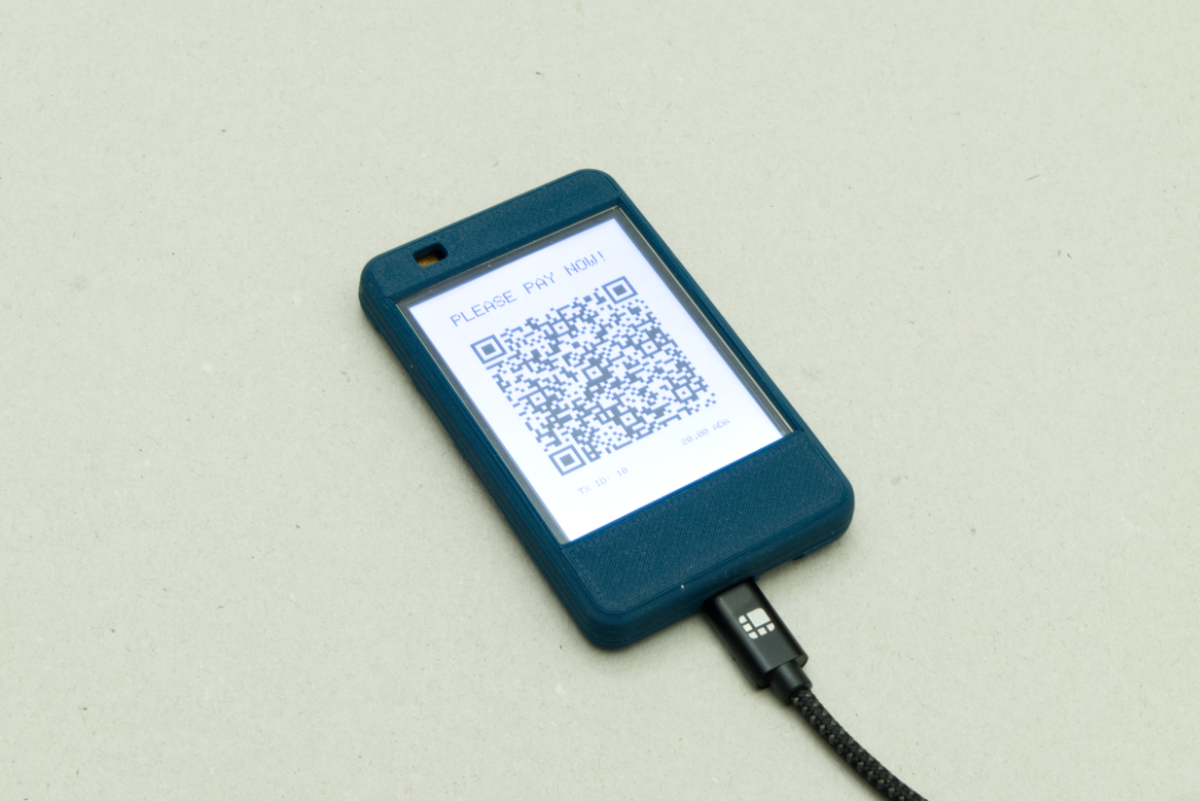
The QR-code display + transaction listener: render the CIP-13 QR with the right amount and address, listen for confirmation, render a confirmation message when the payment lands.
transaction_qr.h:
#ifndef TRANSACTION_QR_H
#define TRANSACTION_QR_H

#include <Arduino.h>

// Forward declaration
class TFT_eSPI;

// Initialize the transaction QR display system
void transactionQRInit(TFT_eSPI &display);

// Display QR code for newly created transaction (called immediately after
// creation)
// transactionId: ID of the transaction
// lovelaceAmount: Amount in lovelace (with ID already added)
void displayNewTransactionQR(TFT_eSPI *display, int transactionId,
                             uint64_t lovelaceAmount);

// Update function to be called in loop() - checks on-chain status and manages
// display states
void transactionQRUpdate(TFT_eSPI &display);

#endif
transaction_qr.cpp:
#include "transaction_qr.h"
#include "secrets.h"
#include <ArduinoJson.h>
#include <HTTPClient.h>
#include <LittleFS.h>
#include <TFT_eSPI.h>
#include <WiFi.h>
#include <qrcode_espi.h>

namespace {
TFT_eSprite *qrSprite = nullptr;
QRcode_eSPI *qrcode = nullptr;
const char *TRANSACTIONS_FILE = "/transactions.json";
unsigned long lastCheckTime = 0;
const unsigned long CHECK_INTERVAL = 10000; // Check every 10 seconds
unsigned long waitingStartTime = 0;
bool isWaitingForPayment = false;
int waitingTransactionId = -1;
uint64_t waitingLovelaceAmount = 0;
unsigned long successStartTime = 0;
bool isShowingSuccess = false;
const unsigned long SUCCESS_DISPLAY_TIME = 10000; // 10 seconds
} // namespace

void transactionQRInit(TFT_eSPI &display) {
  int qrSize = min(display.width(), display.height()) - 20;
  qrSprite = new TFT_eSprite(&display);
  qrSprite->createSprite(qrSize, qrSize);
  qrSprite->fillSprite(TFT_WHITE);
  qrcode = new QRcode_eSPI(qrSprite);
  qrcode->init();

  lastCheckTime = 0;
  waitingStartTime = 0;
  isWaitingForPayment = false;
  waitingTransactionId = -1;
  waitingLovelaceAmount = 0;
  successStartTime = 0;
  isShowingSuccess = false;
}

// Helper: Update transaction hash in LittleFS
bool updateTransactionHash(int transactionId, const String &txHash) {
  if (!LittleFS.exists(TRANSACTIONS_FILE)) {
    return false;
  }

  File file = LittleFS.open(TRANSACTIONS_FILE, "r");
  if (!file) {
    return false;
  }

  DynamicJsonDocument doc(4096);
  DeserializationError error = deserializeJson(doc, file);
  file.close();

  if (error) {
    return false;
  }

  JsonArray transactions = doc.as<JsonArray>();
  bool updated = false;

  for (JsonObject tx : transactions) {
    if (tx.containsKey("id") && tx["id"] == transactionId) {
      tx["txHash"] = txHash;
      updated = true;
      break;
    }
  }

  if (updated) {
    file = LittleFS.open(TRANSACTIONS_FILE, "w");
    if (file) {
      serializeJson(doc, file);
      file.close();
      return true;
    }
  }

  return false;
}

// Helper function: Format lovelace amount to ADA string with precise formatting
// Avoids floating point precision issues by using integer arithmetic
String formatLovelaceToADA(uint64_t lovelaceAmount) {
  uint64_t wholeADA = lovelaceAmount / 1000000;
  uint64_t fractionalLovelace = lovelaceAmount % 1000000;

  String result = String(wholeADA);
  result += ".";

  // Format fractional part with leading zeros (always 6 digits)
  if (fractionalLovelace == 0) {
    result += "000000";
  } else {
    // Add leading zeros if needed
    uint64_t temp = fractionalLovelace;
    int digits = 0;
    while (temp > 0) {
      temp /= 10;
      digits++;
    }
    for (int i = 0; i < 6 - digits; i++) {
      result += "0";
    }
    result += String(fractionalLovelace);
  }

  return result;
}

// Check for transaction using Koios API
// transactionId: ID of the transaction
// lovelaceAmount: Amount in lovelace (with ID already added)
// Returns transaction hash if payment received, empty string otherwise
String checkForTransaction(int transactionId, uint64_t lovelaceAmount) {
  if (!WiFi.isConnected()) {
    Serial.println("[Transaction Check] WiFi not connected, skipping check");
    return "";
  }

  Serial.print("[Transaction Check] Checking for payment - TX ID: ");
  Serial.print(transactionId);
  Serial.print(lovelaceAmount);
  Serial.println(" lovelace)");

  // Build API URL with amount filter
  String url = String(KOIOS_API_URL);
  url += "?value=eq.";
  url += String(lovelaceAmount);

  // Make POST request
  HTTPClient http;
  http.begin(url);
  http.addHeader("Content-Type", "application/json");

  // Build JSON request body
  DynamicJsonDocument requestDoc(512);
  JsonArray addresses = requestDoc.createNestedArray("_addresses");
  addresses.add(PAYMENT_ADDRESS);

  String requestBody;
  serializeJson(requestDoc, requestBody);

  Serial.print("[Transaction Check] Sending request to: ");
  Serial.println(url);
  Serial.print("[Transaction Check] Request body: ");
  Serial.println(requestBody);

  int httpCode = http.POST(requestBody);
  Serial.print("[Transaction Check] HTTP response code: ");
  Serial.println(httpCode);

  if (httpCode == 200) {
    String payload = http.getString();
    DynamicJsonDocument responseDoc(2048);
    DeserializationError error = deserializeJson(responseDoc, payload);
    http.end();

    if (!error && responseDoc.is<JsonArray>()) {
      JsonArray utxos = responseDoc.as<JsonArray>();
      Serial.print("[Transaction Check] Found ");
      Serial.print(utxos.size());
      Serial.println(" UTXO(s)");

      if (utxos.size() > 0 && utxos[0].containsKey("tx_hash")) {
        String txHash = utxos[0]["tx_hash"].as<String>();
        Serial.print("[Transaction Check] Payment found! Transaction hash: ");
        Serial.println(txHash);
        return txHash;
      } else {
        Serial.println(
            "[Transaction Check] No transaction hash in UTXO response");
      }
    } else {
      Serial.print("[Transaction Check] JSON parsing error: ");
      Serial.println(error.c_str());
    }
  } else {
    Serial.print("[Transaction Check] HTTP error, response: ");
    if (httpCode > 0) {
      String payload = http.getString();
      Serial.println(payload);
    } else {
      Serial.println("Connection failed");
    }
  }

  http.end();
  Serial.println("[Transaction Check] No payment found yet");
  return "";
}

// Display success message and update transaction JSON with hash
void displaySuccessAndUpdateHash(TFT_eSPI &display, int transactionId,
                                 const String &txHash) {
  // Update transaction with hash
  updateTransactionHash(transactionId, txHash);

  // Display success message
  display.fillScreen(TFT_BLACK);
  display.setTextColor(TFT_WHITE);
  display.setTextSize(2);
  display.setTextDatum(MC_DATUM);
  display.drawString("Payment Received!", display.width() / 2,
                     display.height() / 2);

  // Set success state and start timer
  isShowingSuccess = true;
  successStartTime = millis();

  Serial.print("Payment received! Transaction hash: ");
  Serial.println(txHash);
  Serial.println("Success message will be shown for 10 seconds");
}

// Display QR code with call to action
void displayWaitingMessage(TFT_eSPI &display, int transactionId,
                           uint64_t lovelaceAmount, bool initialDraw) {
  // Calculate original amount (subtract ID) for display
  uint64_t originalAmount = lovelaceAmount - transactionId;
  float adaAmountForDisplay = (float)originalAmount / 1000000.0;

  // For QR code, use full amount including ID (lovelaceAmount already has ID
  // added)
  // Format using integer arithmetic to avoid floating point precision issues
  String adaAmountForQR = formatLovelaceToADA(lovelaceAmount);

  // Only draw static elements on initial draw
  if (initialDraw) {
    // White background
    display.fillScreen(TFT_WHITE);

    // Build QR code URL (use amount with ID included)
    String qrContent = "web+cardano:";
    qrContent += PAYMENT_ADDRESS;
    qrContent += "?amount=";
    qrContent += adaAmountForQR;

    Serial.print("[Transaction Check] QR content: ");
    Serial.println(qrContent);

    // Generate QR code on sprite (white background, black QR code)
    qrSprite->fillSprite(TFT_WHITE);
    qrcode->create(qrContent);

    // Center QR code horizontally and position vertically
    int spriteX = (display.width() - qrSprite->width()) / 2;
    // Center QR code vertically, accounting for text above and info below
    int spriteY = (display.height() - qrSprite->height()) / 2;
    qrSprite->pushSprite(spriteX, spriteY);

    // Display "PLEASE PAY NOW!" text 20px above QR code
    display.setTextColor(TFT_BLACK);
    display.setTextSize(2);
    display.setTextDatum(TC_DATUM);
    display.drawString("PLEASE PAY NOW!", display.width() / 2, spriteY - 20);

    // Display transaction ID and ADA amount 20px below QR code
    int infoY = spriteY + qrSprite->height();
    display.setTextSize(1);
    display.setTextColor(TFT_BLACK);

    // TX ID left-aligned with 25px padding from left edge of QR code
    display.setTextDatum(TL_DATUM); // Top Left datum
    String txInfo = "TX ID: " + String(transactionId);
    display.drawString(txInfo, spriteX + 25, infoY);

    // ADA amount right-aligned with 25px padding from right edge of QR code
    display.setTextDatum(TR_DATUM); // Top Right datum
    String adaInfo = String(adaAmountForDisplay, 2) + " ADA";
    display.drawString(adaInfo, spriteX + qrSprite->width() - 25, infoY);
  }
}

void displayNewTransactionQR(TFT_eSPI *display, int transactionId,
                             uint64_t lovelaceAmount) {
  if (display == nullptr) {
    return;
  }
  waitingStartTime = millis();
  isWaitingForPayment = true;
  waitingTransactionId = transactionId;
  waitingLovelaceAmount = lovelaceAmount;
  lastCheckTime = millis();

  uint64_t originalAmount = lovelaceAmount - transactionId;
  float adaAmount = (float)originalAmount / 1000000.0;

  Serial.println("========================================");
  Serial.println("[Transaction Listener] Starting to listen for payment");
  Serial.print("  Transaction ID: ");
  Serial.println(transactionId);
  Serial.print("  Amount: ");
  Serial.print(adaAmount, 6);
  Serial.print(" ADA (");
  Serial.print(originalAmount);
  Serial.println(" lovelace)");
  Serial.print("  Payment Address: ");
  Serial.println(PAYMENT_ADDRESS);
  Serial.print("  Check interval: ");
  Serial.print(CHECK_INTERVAL / 1000);
  Serial.println(" seconds");
  Serial.println("========================================");

  // Draw initial waiting screen
  displayWaitingMessage(*display, transactionId, lovelaceAmount, true);
}

void transactionQRUpdate(TFT_eSPI &display) {
  unsigned long currentTime = millis();

  // Check if success message should be cleared (after 10 seconds)
  if (isShowingSuccess) {
    if (currentTime - successStartTime >= SUCCESS_DISPLAY_TIME) {
      // Clear screen to blank
      display.fillScreen(TFT_BLACK);
      isShowingSuccess = false;
      Serial.println("Success message cleared, returning to blank screen");
    }
    return; // Don't check for payments while showing success
  }

  // If waiting for payment, check for payment
  if (isWaitingForPayment && waitingTransactionId != -1) {
    // Check for payment every CHECK_INTERVAL
    if (currentTime - lastCheckTime >= CHECK_INTERVAL) {
      lastCheckTime = currentTime;
      unsigned long waitTimeSeconds = (currentTime - waitingStartTime) / 1000;
      Serial.print("[Transaction Listener] Checking payment (waiting for ");
      Serial.print(waitTimeSeconds);
      Serial.println(" seconds)...");

      String txHash =
          checkForTransaction(waitingTransactionId, waitingLovelaceAmount);
      if (txHash.length() > 0) {
        Serial.println(
            "[Transaction Listener] Payment confirmed! Stopping listener.");
        displaySuccessAndUpdateHash(display, waitingTransactionId, txHash);
        isWaitingForPayment = false;
        waitingTransactionId = -1;
        waitingLovelaceAmount = 0;
      } else {
        Serial.println("[Transaction Listener] Payment not found, will check "
                       "again in 10 seconds");
      }
    }
  }
}
Source:
transaction_qr.cpp
Backend's done. Upload data/ and the complete code to your microcontroller, navigate to the frontend, and test the payment flow.
You'll need to send the exact lovelace amount manually from a desktop wallet - mobile wallets don't yet honour CIP-13 exact amounts.
What's next?
This is the end of the course. Some directions:
- A screensaver when no payment is pending.
- A more sophisticated frontend - touch input on the CYD if your variant supports it.
- A physical vending machine that takes ADA payments.
- A smart locker that opens when an exact amount lands.
These workshops are educational. For production: substantial error handling, authentication on the backend, and a host of other features are missing.
Further Resources
- LVGL - for more sophisticated MCU UIs.
- CIP-0013 spec - current state of integration and next steps.
- CIP-0157 (currently being drafted) - proposal for metadata on CIP-13 URIs.
Adapted from the CardanoThings workshop series, originally produced under Project Catalyst Fund 11. Source code: github.com/CardanoThings/Workshops/Workshop-05.